
Day 61 / 63 · Network automation
REST API
Study notes based primarily on Jeremy’s IT Lab CCNA learning videos. Credit to Jeremy’s IT Lab for the source lessons and diagrams.
REST API
Download original PDF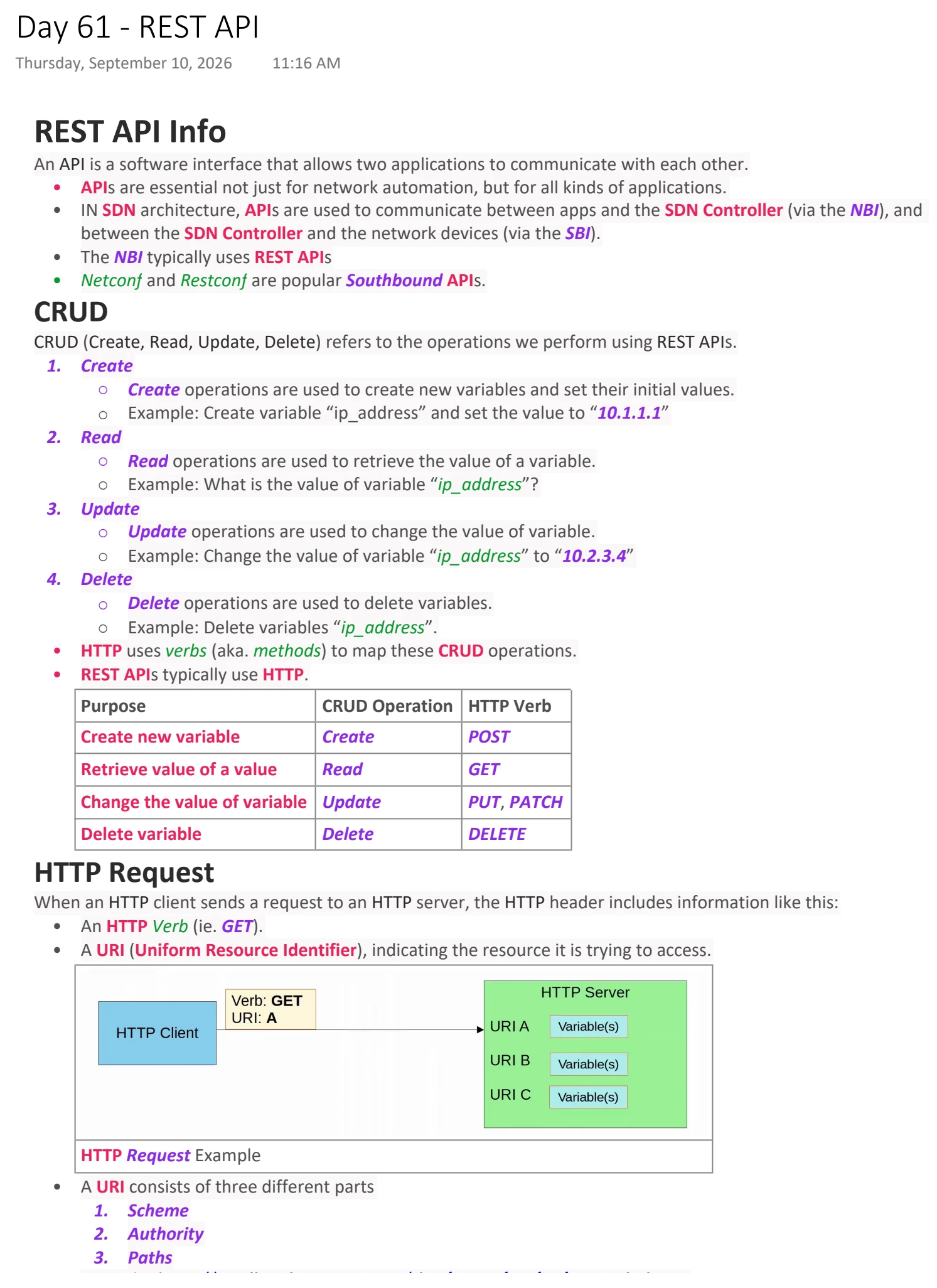
Text view — REST API
Extracted from the original export. Diagrams and some formatting appear in the notes above.
Day 61 - REST API
Thursday, September 10, 2026 11:16 AM
REST API Info
An API is a software interface that allows two applications to communicate with each other.
• APIs are essential not just for network automation, but for all kinds of applications.
• IN SDN architecture, APIs are used to communicate between apps and the SDN Controller (via the NBI), and
between the SDN Controller and the network devices (via the SBI).
• The NBI typically uses REST APIs
• Netconf and Restconf are popular Southbound APIs.
CRUD
CRUD (Create, Read, Update, Delete) refers to the operations we perform using REST APIs.
1. Create
○ Create operations are used to create new variables and set their initial values.
○ Example: Create variable “ip_address” and set the value to “10.1.1.1”
2. Read
○ Read operations are used to retrieve the value of a variable.
○ Example: What is the value of variable “ip_address”?
3. Update
○ Update operations are used to change the value of variable.
○ Example: Change the value of variable “ip_address” to “10.2.3.4”
4. Delete
○ Delete operations are used to delete variables.
○ Example: Delete variables “ip_address”.
• HTTP uses verbs (aka. methods) to map these CRUD operations.
• REST APIs typically use HTTP.
Purpose CRUD Operation HTTP Verb
Create new variable Create POST
Retrieve value of a value Read GET
Change the value of variable Update PUT, PATCH
Delete variable Delete DELETE
HTTP Request
When an HTTP client sends a request to an HTTP server, the HTTP header includes information like this:
• An HTTP Verb (ie. GET).
• A URI (Uniform Resource Identifier), indicating the resource it is trying to access.
HTTP Request Example
• A URI consists of three different parts
1. Scheme
2. Authority
3. Paths
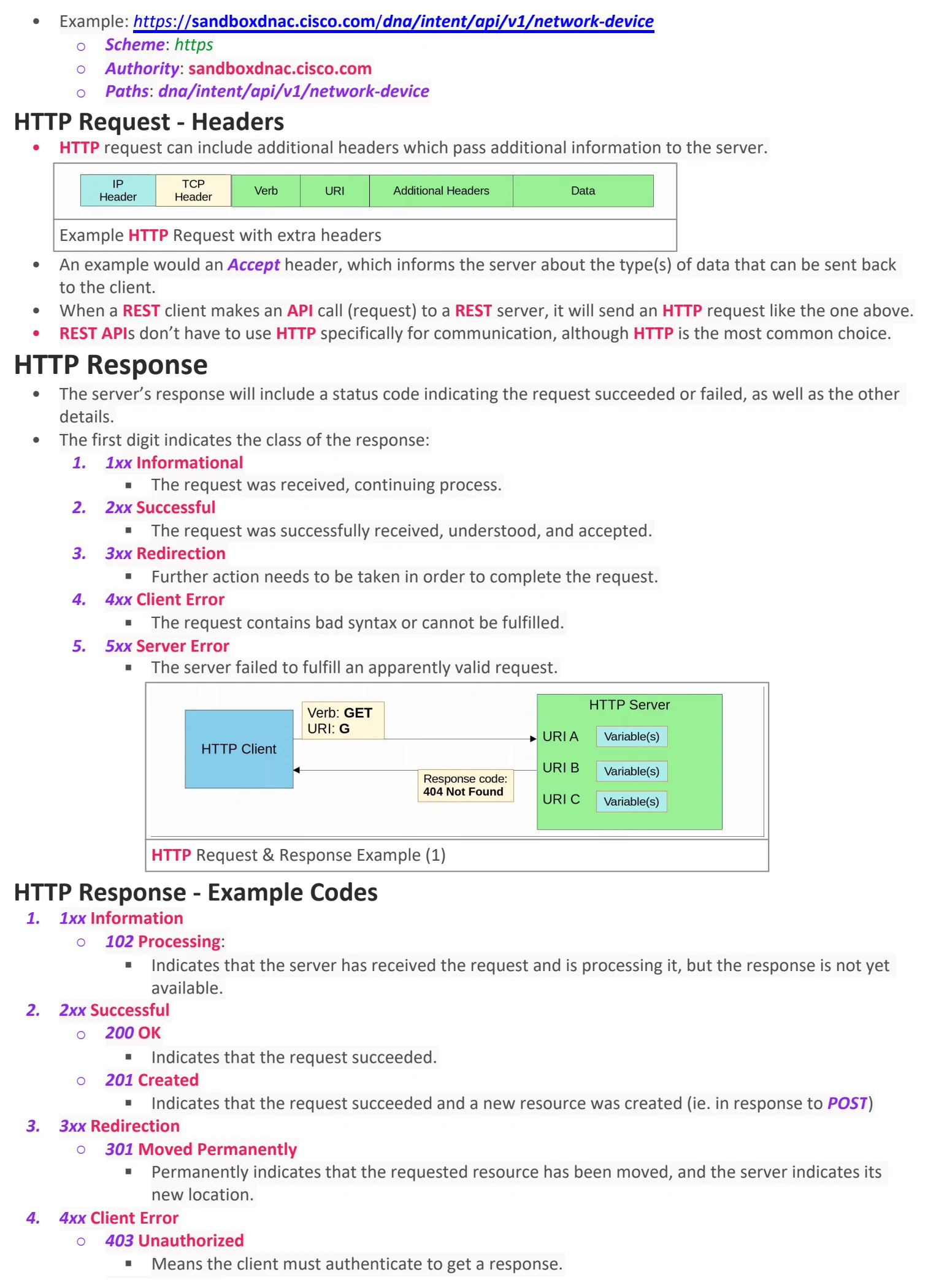
• Example: https://sandboxdnac.cisco.com/dna/intent/api/v1/network-device
○ Scheme: https
○ Authority: sandboxdnac.cisco.com
○ Paths: dna/intent/api/v1/network-device
HTTP Request - Headers
• HTTP request can include additional headers which pass additional information to the server.
Example HTTP Request with extra headers
• An example would an Accept header, which informs the server about the type(s) of data that can be sent back
to the client.
• When a REST client makes an API call (request) to a REST server, it will send an HTTP request like the one above.
• REST APIs don’t have to use HTTP specifically for communication, although HTTP is the most common choice.
HTTP Response
• The server’s response will include a status code indicating the request succeeded or failed, as well as the other
details.
• The first digit indicates the class of the response:
1. 1xx Informational
§ The request was received, continuing process.
2. 2xx Successful
§ The request was successfully received, understood, and accepted.
3. 3xx Redirection
§ Further action needs to be taken in order to complete the request.
4. 4xx Client Error
§ The request contains bad syntax or cannot be fulfilled.
5. 5xx Server Error
§ The server failed to fulfill an apparently valid request.
HTTP Request & Response Example (1)
HTTP Response - Example Codes
1. 1xx Information
○ 102 Processing:
§ Indicates that the server has received the request and is processing it, but the response is not yet
available.
2. 2xx Successful
○ 200 OK
§ Indicates that the request succeeded.
○ 201 Created
§ Indicates that the request succeeded and a new resource was created (ie. in response to POST)
3. 3xx Redirection
○ 301 Moved Permanently
§ Permanently indicates that the requested resource has been moved, and the server indicates its
new location.
4. 4xx Client Error
○ 403 Unauthorized
§ Means the client must authenticate to get a response.
○ 404 Not Found
§ Means the requested resource was not found.
5. 5xx Server Error
○ 500 Internal Server Error
§ Means the server encountered something unexpected that it doesn’t know how to handle.
REST
REST stands for Representational State Transfer.
• REST APIs are also known as REST-based APIs OR RESTful APIs
• REST isn’t a specific API. Instead, it describes a set of rules about how the API should work.
• The six constraints of RESTful architecture are:
1. Uniform Interface
2. Client-server
3. Stateless
4. Cacheable or non-cacheable
5. Layered system
6. Code-on-demand
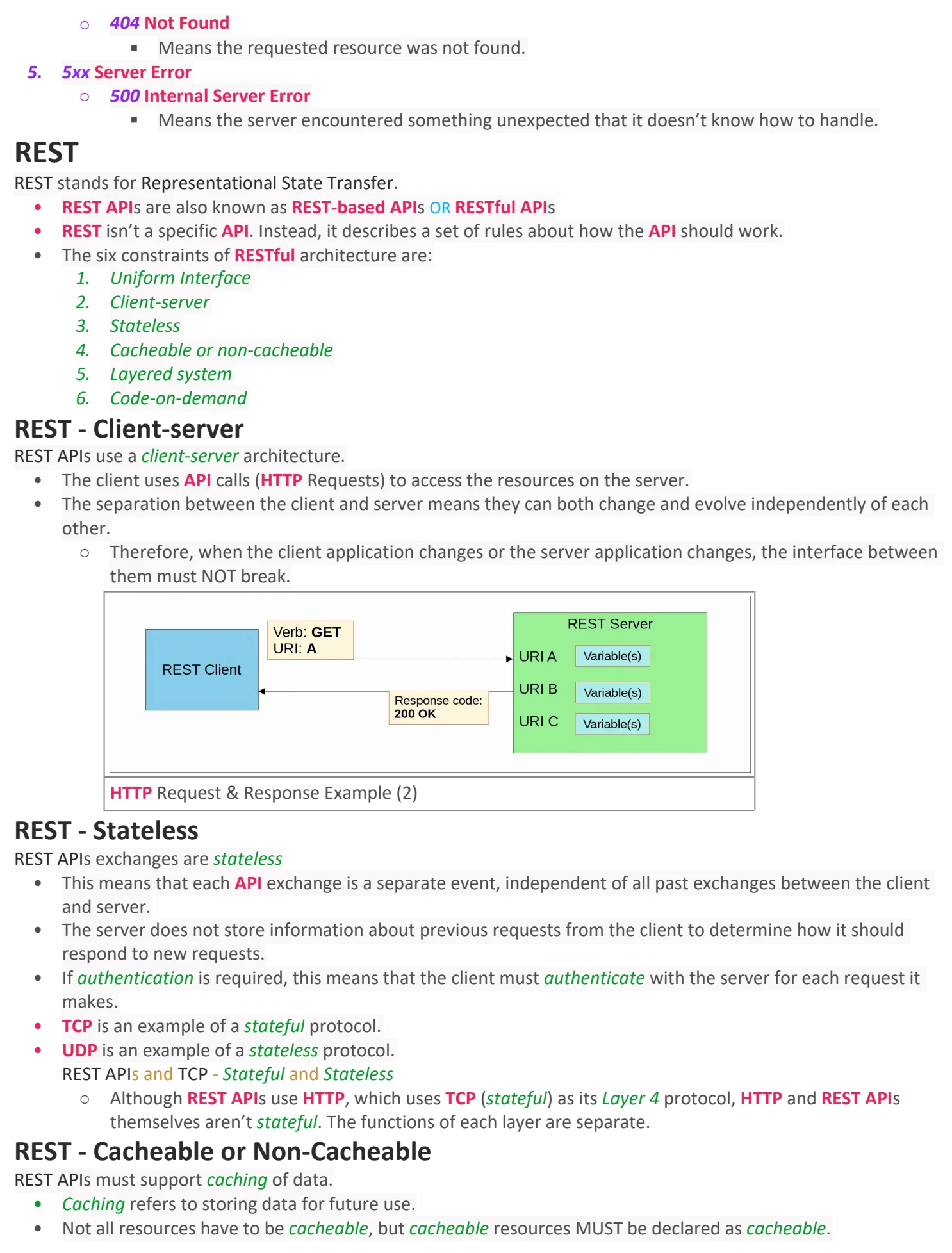
REST - Client-server
REST APIs use a client-server architecture.
• The client uses API calls (HTTP Requests) to access the resources on the server.
• The separation between the client and server means they can both change and evolve independently of each
other.
○ Therefore, when the client application changes or the server application changes, the interface between
them must NOT break.
HTTP Request & Response Example (2)
REST - Stateless
REST APIs exchanges are stateless
• This means that each API exchange is a separate event, independent of all past exchanges between the client
and server.
• The server does not store information about previous requests from the client to determine how it should
respond to new requests.
• If authentication is required, this means that the client must authenticate with the server for each request it
makes.
• TCP is an example of a stateful protocol.
• UDP is an example of a stateless protocol.
REST APIs and TCP - Stateful and Stateless
○ Although REST APIs use HTTP, which uses TCP (stateful) as its Layer 4 protocol, HTTP and REST APIs
themselves aren’t stateful. The functions of each layer are separate.
REST - Cacheable or Non-Cacheable
REST APIs must support caching of data.
• Caching refers to storing data for future use.
• Not all resources have to be cacheable, but cacheable resources MUST be declared as cacheable.

Day 61 - REST API
Thursday, September 10, 2026 11:16 AM
REST API Info
An API is a software interface that allows two applications to communicate with each other.
• APIs are essential not just for network automation, but for all kinds of applications.
• IN SDN architecture, APIs are used to communicate between apps and the SDN Controller (via the NBI), and
between the SDN Controller and the network devices (via the SBI).
• The NBI typically uses REST APIs
• Netconf and Restconf are popular Southbound APIs.
CRUD
CRUD (Create, Read, Update, Delete) refers to the operations we perform using REST APIs.
1. Create
○ Create operations are used to create new variables and set their initial values.
○ Example: Create variable “ip_address” and set the value to “10.1.1.1”
2. Read
○ Read operations are used to retrieve the value of a variable.
○ Example: What is the value of variable “ip_address”?
3. Update
○ Update operations are used to change the value of variable.
○ Example: Change the value of variable “ip_address” to “10.2.3.4”
4. Delete
○ Delete operations are used to delete variables.
○ Example: Delete variables “ip_address”.
• HTTP uses verbs (aka. methods) to map these CRUD operations.
• REST APIs typically use HTTP.
Purpose CRUD Operation HTTP Verb
Create new variable Create POST
Retrieve value of a value Read GET
Change the value of variable Update PUT, PATCH
Delete variable Delete DELETE
HTTP Request
When an HTTP client sends a request to an HTTP server, the HTTP header includes information like this:
• An HTTP Verb (ie. GET).
• A URI (Uniform Resource Identifier), indicating the resource it is trying to access.
HTTP Request Example
• A URI consists of three different parts
1. Scheme
2. Authority
3. Paths
• Example: https://sandboxdnac.cisco.com/dna/intent/api/v1/network-device
○ Scheme: https
○ Authority: sandboxdnac.cisco.com
○ Paths: dna/intent/api/v1/network-device
HTTP Request - Headers
• HTTP request can include additional headers which pass additional information to the server.
Example HTTP Request with extra headers
• An example would an Accept header, which informs the server about the type(s) of data that can be sent back
to the client.
• When a REST client makes an API call (request) to a REST server, it will send an HTTP request like the one above.
• REST APIs don’t have to use HTTP specifically for communication, although HTTP is the most common choice.
HTTP Response
• The server’s response will include a status code indicating the request succeeded or failed, as well as the other
details.
• The first digit indicates the class of the response:
1. 1xx Informational
§ The request was received, continuing process.
2. 2xx Successful
§ The request was successfully received, understood, and accepted.
3. 3xx Redirection
§ Further action needs to be taken in order to complete the request.
4. 4xx Client Error
§ The request contains bad syntax or cannot be fulfilled.
5. 5xx Server Error
§ The server failed to fulfill an apparently valid request.
HTTP Request & Response Example (1)
HTTP Response - Example Codes
1. 1xx Information
○ 102 Processing:
§ Indicates that the server has received the request and is processing it, but the response is not yet
available.
2. 2xx Successful
○ 200 OK
§ Indicates that the request succeeded.
○ 201 Created
§ Indicates that the request succeeded and a new resource was created (ie. in response to POST)
3. 3xx Redirection
○ 301 Moved Permanently
§ Permanently indicates that the requested resource has been moved, and the server indicates its
new location.
4. 4xx Client Error
○ 403 Unauthorized
§ Means the client must authenticate to get a response.
○ 404 Not Found
§ Means the requested resource was not found.
5. 5xx Server Error
○ 500 Internal Server Error
§ Means the server encountered something unexpected that it doesn’t know how to handle.
REST
REST stands for Representational State Transfer.
• REST APIs are also known as REST-based APIs OR RESTful APIs
• REST isn’t a specific API. Instead, it describes a set of rules about how the API should work.
• The six constraints of RESTful architecture are:
1. Uniform Interface
2. Client-server
3. Stateless
4. Cacheable or non-cacheable
5. Layered system
6. Code-on-demand
REST - Client-server
REST APIs use a client-server architecture.
• The client uses API calls (HTTP Requests) to access the resources on the server.
• The separation between the client and server means they can both change and evolve independently of each
other.
○ Therefore, when the client application changes or the server application changes, the interface between
them must NOT break.
HTTP Request & Response Example (2)
REST - Stateless
REST APIs exchanges are stateless
• This means that each API exchange is a separate event, independent of all past exchanges between the client
and server.
• The server does not store information about previous requests from the client to determine how it should
respond to new requests.
• If authentication is required, this means that the client must authenticate with the server for each request it
makes.
• TCP is an example of a stateful protocol.
• UDP is an example of a stateless protocol.
REST APIs and TCP - Stateful and Stateless
○ Although REST APIs use HTTP, which uses TCP (stateful) as its Layer 4 protocol, HTTP and REST APIs
themselves aren’t stateful. The functions of each layer are separate.
REST - Cacheable or Non-Cacheable
REST APIs must support caching of data.
• Caching refers to storing data for future use.
• Not all resources have to be cacheable, but cacheable resources MUST be declared as cacheable.

Day 61 - REST API
Thursday, September 10, 2026 11:16 AM
REST API Info
An API is a software interface that allows two applications to communicate with each other.
• APIs are essential not just for network automation, but for all kinds of applications.
• IN SDN architecture, APIs are used to communicate between apps and the SDN Controller (via the NBI), and
between the SDN Controller and the network devices (via the SBI).
• The NBI typically uses REST APIs
• Netconf and Restconf are popular Southbound APIs.
CRUD
CRUD (Create, Read, Update, Delete) refers to the operations we perform using REST APIs.
1. Create
○ Create operations are used to create new variables and set their initial values.
○ Example: Create variable “ip_address” and set the value to “10.1.1.1”
2. Read
○ Read operations are used to retrieve the value of a variable.
○ Example: What is the value of variable “ip_address”?
3. Update
○ Update operations are used to change the value of variable.
○ Example: Change the value of variable “ip_address” to “10.2.3.4”
4. Delete
○ Delete operations are used to delete variables.
○ Example: Delete variables “ip_address”.
• HTTP uses verbs (aka. methods) to map these CRUD operations.
• REST APIs typically use HTTP.
Purpose CRUD Operation HTTP Verb
Create new variable Create POST
Retrieve value of a value Read GET
Change the value of variable Update PUT, PATCH
Delete variable Delete DELETE
HTTP Request
When an HTTP client sends a request to an HTTP server, the HTTP header includes information like this:
• An HTTP Verb (ie. GET).
• A URI (Uniform Resource Identifier), indicating the resource it is trying to access.
HTTP Request Example
• A URI consists of three different parts
1. Scheme
2. Authority
3. Paths
• Example: https://sandboxdnac.cisco.com/dna/intent/api/v1/network-device
○ Scheme: https
○ Authority: sandboxdnac.cisco.com
○ Paths: dna/intent/api/v1/network-device
HTTP Request - Headers
• HTTP request can include additional headers which pass additional information to the server.
Example HTTP Request with extra headers
• An example would an Accept header, which informs the server about the type(s) of data that can be sent back
to the client.
• When a REST client makes an API call (request) to a REST server, it will send an HTTP request like the one above.
• REST APIs don’t have to use HTTP specifically for communication, although HTTP is the most common choice.
HTTP Response
• The server’s response will include a status code indicating the request succeeded or failed, as well as the other
details.
• The first digit indicates the class of the response:
1. 1xx Informational
§ The request was received, continuing process.
2. 2xx Successful
§ The request was successfully received, understood, and accepted.
3. 3xx Redirection
§ Further action needs to be taken in order to complete the request.
4. 4xx Client Error
§ The request contains bad syntax or cannot be fulfilled.
5. 5xx Server Error
§ The server failed to fulfill an apparently valid request.
HTTP Request & Response Example (1)
HTTP Response - Example Codes
1. 1xx Information
○ 102 Processing:
§ Indicates that the server has received the request and is processing it, but the response is not yet
available.
2. 2xx Successful
○ 200 OK
§ Indicates that the request succeeded.
○ 201 Created
§ Indicates that the request succeeded and a new resource was created (ie. in response to POST)
3. 3xx Redirection
○ 301 Moved Permanently
§ Permanently indicates that the requested resource has been moved, and the server indicates its
new location.
4. 4xx Client Error
○ 403 Unauthorized
§ Means the client must authenticate to get a response.
○ 404 Not Found
§ Means the requested resource was not found.
5. 5xx Server Error
○ 500 Internal Server Error
§ Means the server encountered something unexpected that it doesn’t know how to handle.
REST
REST stands for Representational State Transfer.
• REST APIs are also known as REST-based APIs OR RESTful APIs
• REST isn’t a specific API. Instead, it describes a set of rules about how the API should work.
• The six constraints of RESTful architecture are:
1. Uniform Interface
2. Client-server
3. Stateless
4. Cacheable or non-cacheable
5. Layered system
6. Code-on-demand
REST - Client-server
REST APIs use a client-server architecture.
• The client uses API calls (HTTP Requests) to access the resources on the server.
• The separation between the client and server means they can both change and evolve independently of each
other.
○ Therefore, when the client application changes or the server application changes, the interface between
them must NOT break.
HTTP Request & Response Example (2)
REST - Stateless
REST APIs exchanges are stateless
• This means that each API exchange is a separate event, independent of all past exchanges between the client
and server.
• The server does not store information about previous requests from the client to determine how it should
respond to new requests.
• If authentication is required, this means that the client must authenticate with the server for each request it
makes.
• TCP is an example of a stateful protocol.
• UDP is an example of a stateless protocol.
REST APIs and TCP - Stateful and Stateless
○ Although REST APIs use HTTP, which uses TCP (stateful) as its Layer 4 protocol, HTTP and REST APIs
themselves aren’t stateful. The functions of each layer are separate.
REST - Cacheable or Non-Cacheable
REST APIs must support caching of data.
• Caching refers to storing data for future use.
• Not all resources have to be cacheable, but cacheable resources MUST be declared as cacheable.