
Day 41 / 63 · Network services
Syslog
Study notes based primarily on Jeremy’s IT Lab CCNA learning videos. Credit to Jeremy’s IT Lab for the source lessons and diagrams.
Syslog
Download original PDF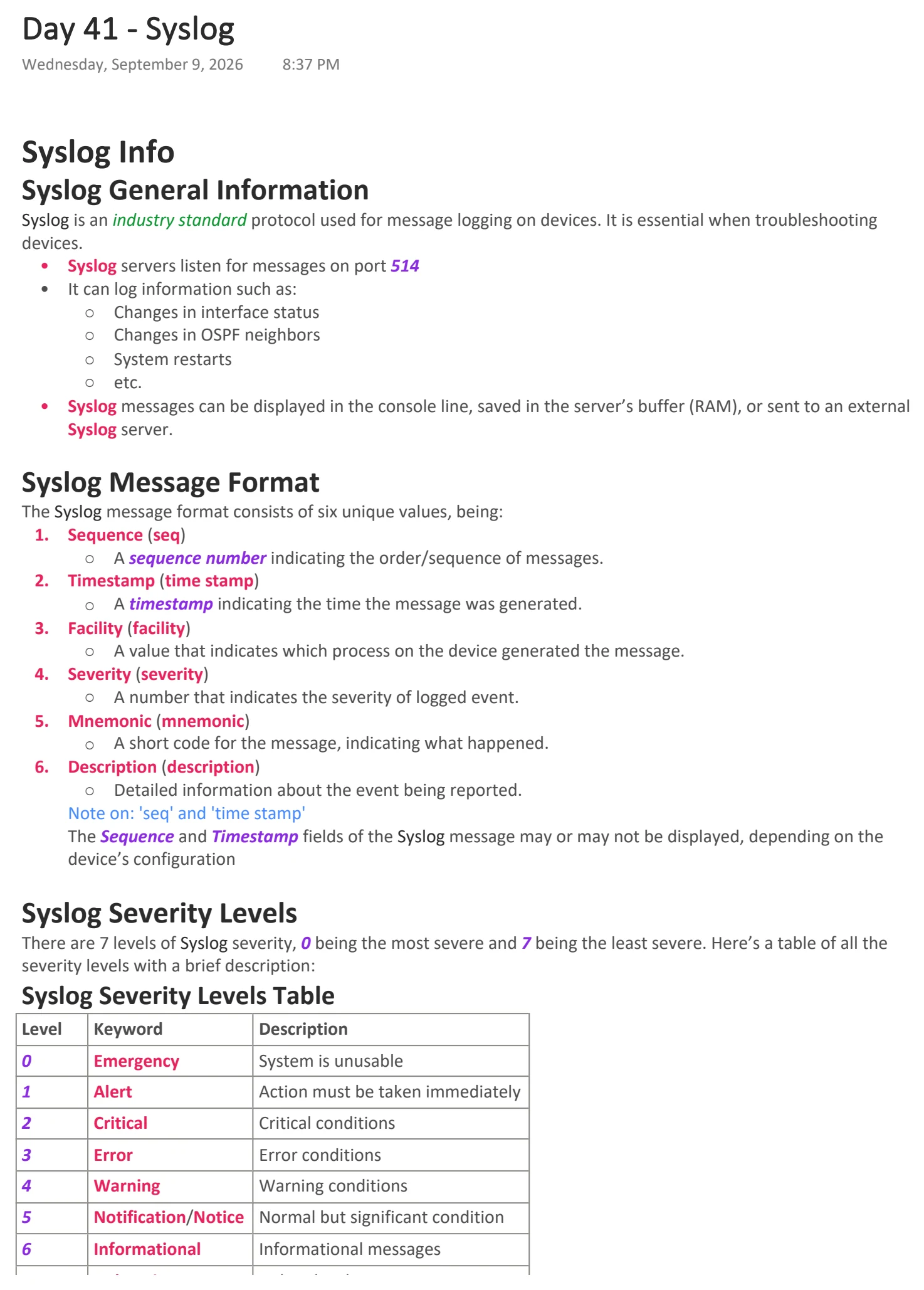
Text view — Syslog
Extracted from the original export. Diagrams and some formatting appear in the notes above.
Day 41 - Syslog
Wednesday, September 9, 2026 8:37 PM
Syslog Info
Syslog General Information
Syslog is an industry standard protocol used for message logging on devices. It is essential when troubleshooting
devices.
• Syslog servers listen for messages on port 514
• It can log information such as:
○ Changes in interface status
○ Changes in OSPF neighbors
○ System restarts
○ etc.
• Syslog messages can be displayed in the console line, saved in the server’s buffer (RAM), or sent to an external
Syslog server.
Syslog Message Format
The Syslog message format consists of six unique values, being:
1. Sequence (seq)
○ A sequence number indicating the order/sequence of messages.
2. Timestamp (time stamp)
○ A timestamp indicating the time the message was generated.
3. Facility (facility)
○ A value that indicates which process on the device generated the message.
4. Severity (severity)
○ A number that indicates the severity of logged event.
5. Mnemonic (mnemonic)
○ A short code for the message, indicating what happened.
6. Description (description)
○ Detailed information about the event being reported.
Note on: 'seq' and 'time stamp'
The Sequence and Timestamp fields of the Syslog message may or may not be displayed, depending on the
device’s configuration
Syslog Severity Levels
There are 7 levels of Syslog severity, 0 being the most severe and 7 being the least severe. Here’s a table of all the
severity levels with a brief description:
Syslog Severity Levels Table
Level Keyword Description
0 Emergency System is unusable
1 Alert Action must be taken immediately
2 Critical Critical conditions
3 Error Error conditions
4 Warning Warning conditions
5 Notification/Notice Normal but significant condition
6 Informational Informational messages
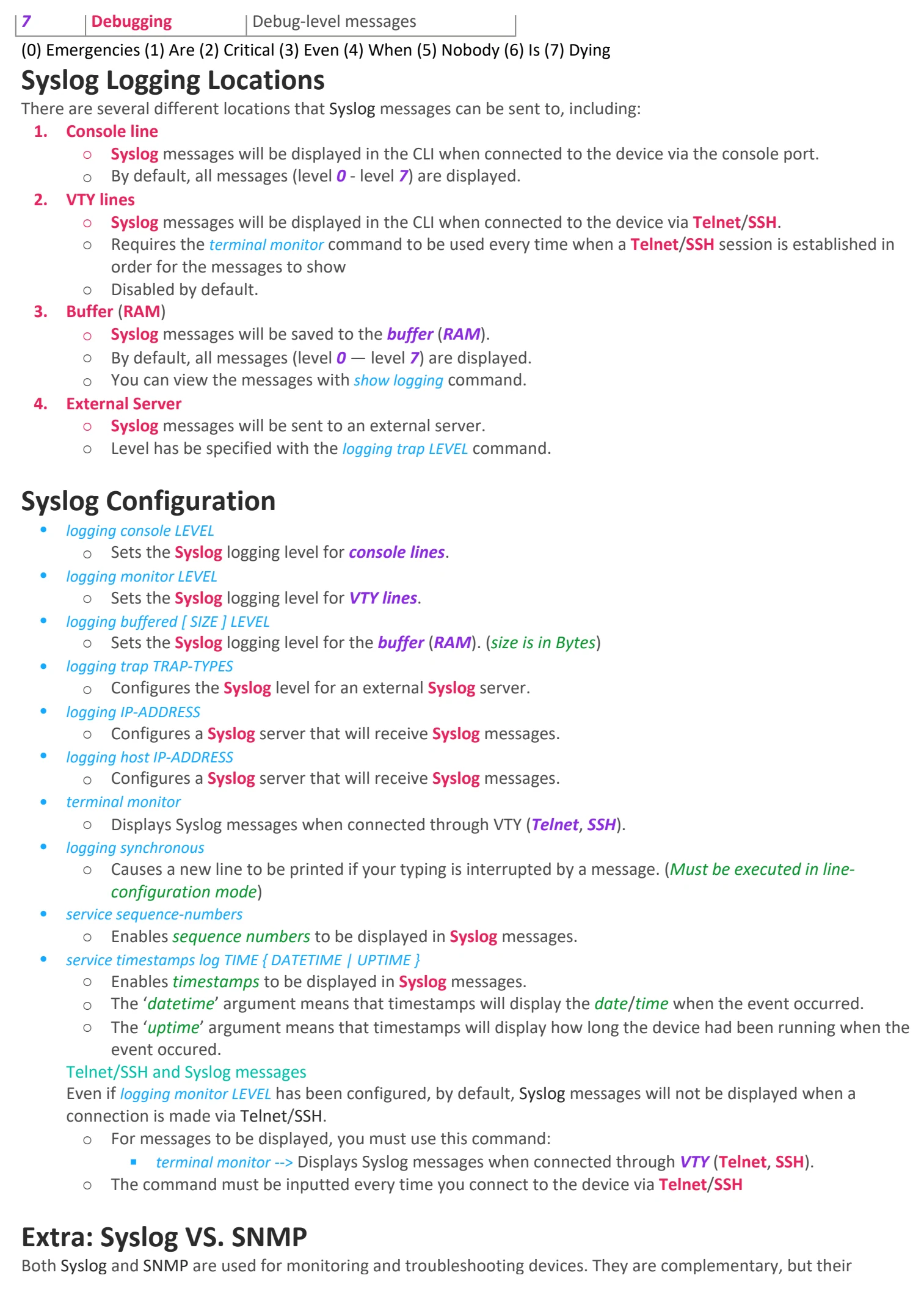
7 Debugging Debug-level messages
(0) Emergencies (1) Are (2) Critical (3) Even (4) When (5) Nobody (6) Is (7) Dying
Syslog Logging Locations
There are several different locations that Syslog messages can be sent to, including:
1. Console line
○ Syslog messages will be displayed in the CLI when connected to the device via the console port.
○ By default, all messages (level 0 - level 7) are displayed.
2. VTY lines
○ Syslog messages will be displayed in the CLI when connected to the device via Telnet/SSH.
○ Requires the terminal monitor command to be used every time when a Telnet/SSH session is established in
order for the messages to show
○ Disabled by default.
3. Buffer (RAM)
○ Syslog messages will be saved to the buffer (RAM).
○ By default, all messages (level 0 — level 7) are displayed.
○ You can view the messages with show logging command.
4. External Server
○ Syslog messages will be sent to an external server.
○ Level has be specified with the logging trap LEVEL command.
Syslog Configuration
• logging console LEVEL
○ Sets the Syslog logging level for console lines.
• logging monitor LEVEL
○ Sets the Syslog logging level for VTY lines.
• logging buffered [ SIZE ] LEVEL
○ Sets the Syslog logging level for the buffer (RAM). (size is in Bytes)
• logging trap TRAP-TYPES
○ Configures the Syslog level for an external Syslog server.
• logging IP-ADDRESS
○ Configures a Syslog server that will receive Syslog messages.
• logging host IP-ADDRESS
○ Configures a Syslog server that will receive Syslog messages.
• terminal monitor
○ Displays Syslog messages when connected through VTY (Telnet, SSH).
• logging synchronous
○ Causes a new line to be printed if your typing is interrupted by a message. (Must be executed in line-
configuration mode)
• service sequence-numbers
○ Enables sequence numbers to be displayed in Syslog messages.
• service timestamps log TIME { DATETIME | UPTIME }
○ Enables timestamps to be displayed in Syslog messages.
○ The ‘datetime’ argument means that timestamps will display the date/time when the event occurred.
○ The ‘uptime’ argument means that timestamps will display how long the device had been running when the
event occured.
Telnet/SSH and Syslog messages
Even if logging monitor LEVEL has been configured, by default, Syslog messages will not be displayed when a
connection is made via Telnet/SSH.
○ For messages to be displayed, you must use this command:
§ terminal monitor --> Displays Syslog messages when connected through VTY (Telnet, SSH).
○ The command must be inputted every time you connect to the device via Telnet/SSH
Extra: Syslog VS. SNMP
Both Syslog and SNMP are used for monitoring and troubleshooting devices. They are complementary, but their
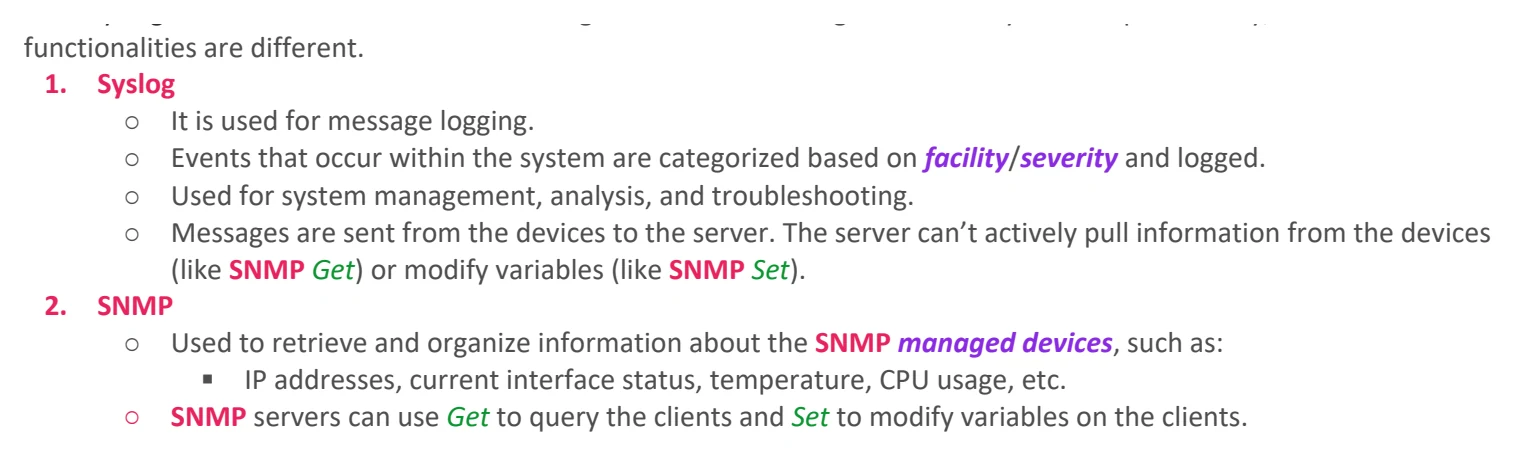
functionalities are different.
1. Syslog
○ It is used for message logging.
○ Events that occur within the system are categorized based on facility/severity and logged.
○ Used for system management, analysis, and troubleshooting.
○ Messages are sent from the devices to the server. The server can’t actively pull information from the devices
(like SNMP Get) or modify variables (like SNMP Set).
2. SNMP
○ Used to retrieve and organize information about the SNMP managed devices, such as:
§ IP addresses, current interface status, temperature, CPU usage, etc.
○ SNMP servers can use Get to query the clients and Set to modify variables on the clients.

Day 41 - Syslog
Wednesday, September 9, 2026 8:37 PM
Syslog Info
Syslog General Information
Syslog is an industry standard protocol used for message logging on devices. It is essential when troubleshooting
devices.
• Syslog servers listen for messages on port 514
• It can log information such as:
○ Changes in interface status
○ Changes in OSPF neighbors
○ System restarts
○ etc.
• Syslog messages can be displayed in the console line, saved in the server’s buffer (RAM), or sent to an external
Syslog server.
Syslog Message Format
The Syslog message format consists of six unique values, being:
1. Sequence (seq)
○ A sequence number indicating the order/sequence of messages.
2. Timestamp (time stamp)
○ A timestamp indicating the time the message was generated.
3. Facility (facility)
○ A value that indicates which process on the device generated the message.
4. Severity (severity)
○ A number that indicates the severity of logged event.
5. Mnemonic (mnemonic)
○ A short code for the message, indicating what happened.
6. Description (description)
○ Detailed information about the event being reported.
Note on: 'seq' and 'time stamp'
The Sequence and Timestamp fields of the Syslog message may or may not be displayed, depending on the
device’s configuration
Syslog Severity Levels
There are 7 levels of Syslog severity, 0 being the most severe and 7 being the least severe. Here’s a table of all the
severity levels with a brief description:
Syslog Severity Levels Table
Level Keyword Description
0 Emergency System is unusable
1 Alert Action must be taken immediately
2 Critical Critical conditions
3 Error Error conditions
4 Warning Warning conditions
5 Notification/Notice Normal but significant condition
6 Informational Informational messages
7 Debugging Debug-level messages
(0) Emergencies (1) Are (2) Critical (3) Even (4) When (5) Nobody (6) Is (7) Dying
Syslog Logging Locations
There are several different locations that Syslog messages can be sent to, including:
1. Console line
○ Syslog messages will be displayed in the CLI when connected to the device via the console port.
○ By default, all messages (level 0 - level 7) are displayed.
2. VTY lines
○ Syslog messages will be displayed in the CLI when connected to the device via Telnet/SSH.
○ Requires the terminal monitor command to be used every time when a Telnet/SSH session is established in
order for the messages to show
○ Disabled by default.
3. Buffer (RAM)
○ Syslog messages will be saved to the buffer (RAM).
○ By default, all messages (level 0 — level 7) are displayed.
○ You can view the messages with show logging command.
4. External Server
○ Syslog messages will be sent to an external server.
○ Level has be specified with the logging trap LEVEL command.
Syslog Configuration
• logging console LEVEL
○ Sets the Syslog logging level for console lines.
• logging monitor LEVEL
○ Sets the Syslog logging level for VTY lines.
• logging buffered [ SIZE ] LEVEL
○ Sets the Syslog logging level for the buffer (RAM). (size is in Bytes)
• logging trap TRAP-TYPES
○ Configures the Syslog level for an external Syslog server.
• logging IP-ADDRESS
○ Configures a Syslog server that will receive Syslog messages.
• logging host IP-ADDRESS
○ Configures a Syslog server that will receive Syslog messages.
• terminal monitor
○ Displays Syslog messages when connected through VTY (Telnet, SSH).
• logging synchronous
○ Causes a new line to be printed if your typing is interrupted by a message. (Must be executed in line-
configuration mode)
• service sequence-numbers
○ Enables sequence numbers to be displayed in Syslog messages.
• service timestamps log TIME { DATETIME | UPTIME }
○ Enables timestamps to be displayed in Syslog messages.
○ The ‘datetime’ argument means that timestamps will display the date/time when the event occurred.
○ The ‘uptime’ argument means that timestamps will display how long the device had been running when the
event occured.
Telnet/SSH and Syslog messages
Even if logging monitor LEVEL has been configured, by default, Syslog messages will not be displayed when a
connection is made via Telnet/SSH.
○ For messages to be displayed, you must use this command:
§ terminal monitor --> Displays Syslog messages when connected through VTY (Telnet, SSH).
○ The command must be inputted every time you connect to the device via Telnet/SSH
Extra: Syslog VS. SNMP
Both Syslog and SNMP are used for monitoring and troubleshooting devices. They are complementary, but their
functionalities are different.
1. Syslog
○ It is used for message logging.
○ Events that occur within the system are categorized based on facility/severity and logged.
○ Used for system management, analysis, and troubleshooting.
○ Messages are sent from the devices to the server. The server can’t actively pull information from the devices
(like SNMP Get) or modify variables (like SNMP Set).
2. SNMP
○ Used to retrieve and organize information about the SNMP managed devices, such as:
§ IP addresses, current interface status, temperature, CPU usage, etc.
○ SNMP servers can use Get to query the clients and Set to modify variables on the clients.

Day 41 - Syslog
Wednesday, September 9, 2026 8:37 PM
Syslog Info
Syslog General Information
Syslog is an industry standard protocol used for message logging on devices. It is essential when troubleshooting
devices.
• Syslog servers listen for messages on port 514
• It can log information such as:
○ Changes in interface status
○ Changes in OSPF neighbors
○ System restarts
○ etc.
• Syslog messages can be displayed in the console line, saved in the server’s buffer (RAM), or sent to an external
Syslog server.
Syslog Message Format
The Syslog message format consists of six unique values, being:
1. Sequence (seq)
○ A sequence number indicating the order/sequence of messages.
2. Timestamp (time stamp)
○ A timestamp indicating the time the message was generated.
3. Facility (facility)
○ A value that indicates which process on the device generated the message.
4. Severity (severity)
○ A number that indicates the severity of logged event.
5. Mnemonic (mnemonic)
○ A short code for the message, indicating what happened.
6. Description (description)
○ Detailed information about the event being reported.
Note on: 'seq' and 'time stamp'
The Sequence and Timestamp fields of the Syslog message may or may not be displayed, depending on the
device’s configuration
Syslog Severity Levels
There are 7 levels of Syslog severity, 0 being the most severe and 7 being the least severe. Here’s a table of all the
severity levels with a brief description:
Syslog Severity Levels Table
Level Keyword Description
0 Emergency System is unusable
1 Alert Action must be taken immediately
2 Critical Critical conditions
3 Error Error conditions
4 Warning Warning conditions
5 Notification/Notice Normal but significant condition
6 Informational Informational messages
7 Debugging Debug-level messages
(0) Emergencies (1) Are (2) Critical (3) Even (4) When (5) Nobody (6) Is (7) Dying
Syslog Logging Locations
There are several different locations that Syslog messages can be sent to, including:
1. Console line
○ Syslog messages will be displayed in the CLI when connected to the device via the console port.
○ By default, all messages (level 0 - level 7) are displayed.
2. VTY lines
○ Syslog messages will be displayed in the CLI when connected to the device via Telnet/SSH.
○ Requires the terminal monitor command to be used every time when a Telnet/SSH session is established in
order for the messages to show
○ Disabled by default.
3. Buffer (RAM)
○ Syslog messages will be saved to the buffer (RAM).
○ By default, all messages (level 0 — level 7) are displayed.
○ You can view the messages with show logging command.
4. External Server
○ Syslog messages will be sent to an external server.
○ Level has be specified with the logging trap LEVEL command.
Syslog Configuration
• logging console LEVEL
○ Sets the Syslog logging level for console lines.
• logging monitor LEVEL
○ Sets the Syslog logging level for VTY lines.
• logging buffered [ SIZE ] LEVEL
○ Sets the Syslog logging level for the buffer (RAM). (size is in Bytes)
• logging trap TRAP-TYPES
○ Configures the Syslog level for an external Syslog server.
• logging IP-ADDRESS
○ Configures a Syslog server that will receive Syslog messages.
• logging host IP-ADDRESS
○ Configures a Syslog server that will receive Syslog messages.
• terminal monitor
○ Displays Syslog messages when connected through VTY (Telnet, SSH).
• logging synchronous
○ Causes a new line to be printed if your typing is interrupted by a message. (Must be executed in line-
configuration mode)
• service sequence-numbers
○ Enables sequence numbers to be displayed in Syslog messages.
• service timestamps log TIME { DATETIME | UPTIME }
○ Enables timestamps to be displayed in Syslog messages.
○ The ‘datetime’ argument means that timestamps will display the date/time when the event occurred.
○ The ‘uptime’ argument means that timestamps will display how long the device had been running when the
event occured.
Telnet/SSH and Syslog messages
Even if logging monitor LEVEL has been configured, by default, Syslog messages will not be displayed when a
connection is made via Telnet/SSH.
○ For messages to be displayed, you must use this command:
§ terminal monitor --> Displays Syslog messages when connected through VTY (Telnet, SSH).
○ The command must be inputted every time you connect to the device via Telnet/SSH
Extra: Syslog VS. SNMP
Both Syslog and SNMP are used for monitoring and troubleshooting devices. They are complementary, but their
functionalities are different.
1. Syslog
○ It is used for message logging.
○ Events that occur within the system are categorized based on facility/severity and logged.
○ Used for system management, analysis, and troubleshooting.
○ Messages are sent from the devices to the server. The server can’t actively pull information from the devices
(like SNMP Get) or modify variables (like SNMP Set).
2. SNMP
○ Used to retrieve and organize information about the SNMP managed devices, such as:
§ IP addresses, current interface status, temperature, CPU usage, etc.
○ SNMP servers can use Get to query the clients and Set to modify variables on the clients.