
Day 19 / 63 · Switching & VLANs
DTP / VTP (Not in Syllabus)
Study notes based primarily on Jeremy’s IT Lab CCNA learning videos. Credit to Jeremy’s IT Lab for the source lessons and diagrams.
DTP / VTP (Not in Syllabus)
Download original PDF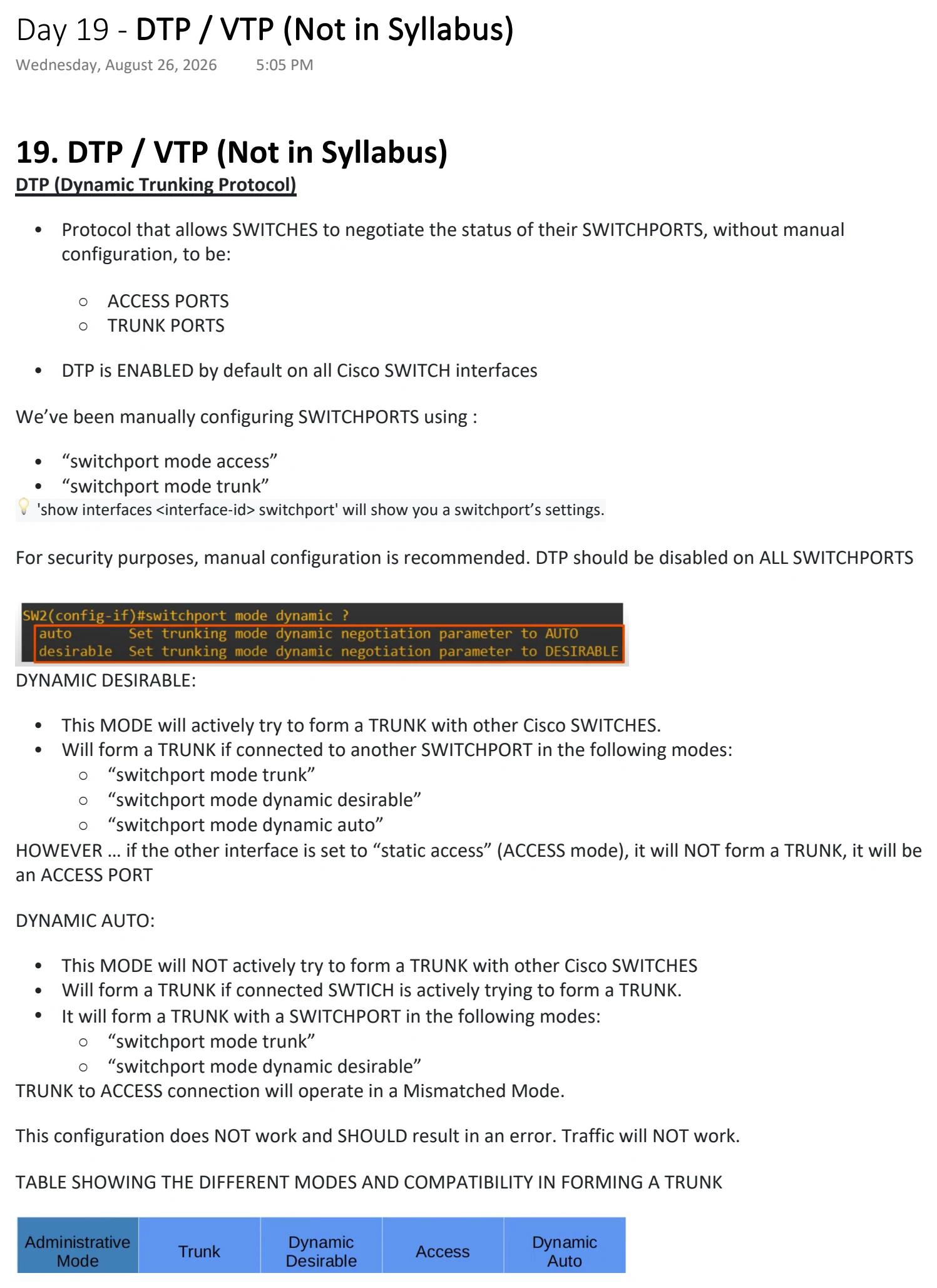
Text view — DTP / VTP (Not in Syllabus)
Extracted from the original export. Diagrams and some formatting appear in the notes above.
Day 19 - DTP / VTP (Not in Syllabus)
Wednesday, August 26, 2026 5:05 PM
19. DTP / VTP (Not in Syllabus)
DTP (Dynamic Trunking Protocol)
• Protocol that allows SWITCHES to negotiate the status of their SWITCHPORTS, without manual
configuration, to be:
○ ACCESS PORTS
○ TRUNK PORTS
• DTP is ENABLED by default on all Cisco SWITCH interfaces
We’ve been manually configuring SWITCHPORTS using :
• “switchport mode access”
• “switchport mode trunk”
💡 'show interfaces <interface-id> switchport' will show you a switchport’s settings.
For security purposes, manual configuration is recommended. DTP should be disabled on ALL SWITCHPORTS
DYNAMIC DESIRABLE:
• This MODE will actively try to form a TRUNK with other Cisco SWITCHES.
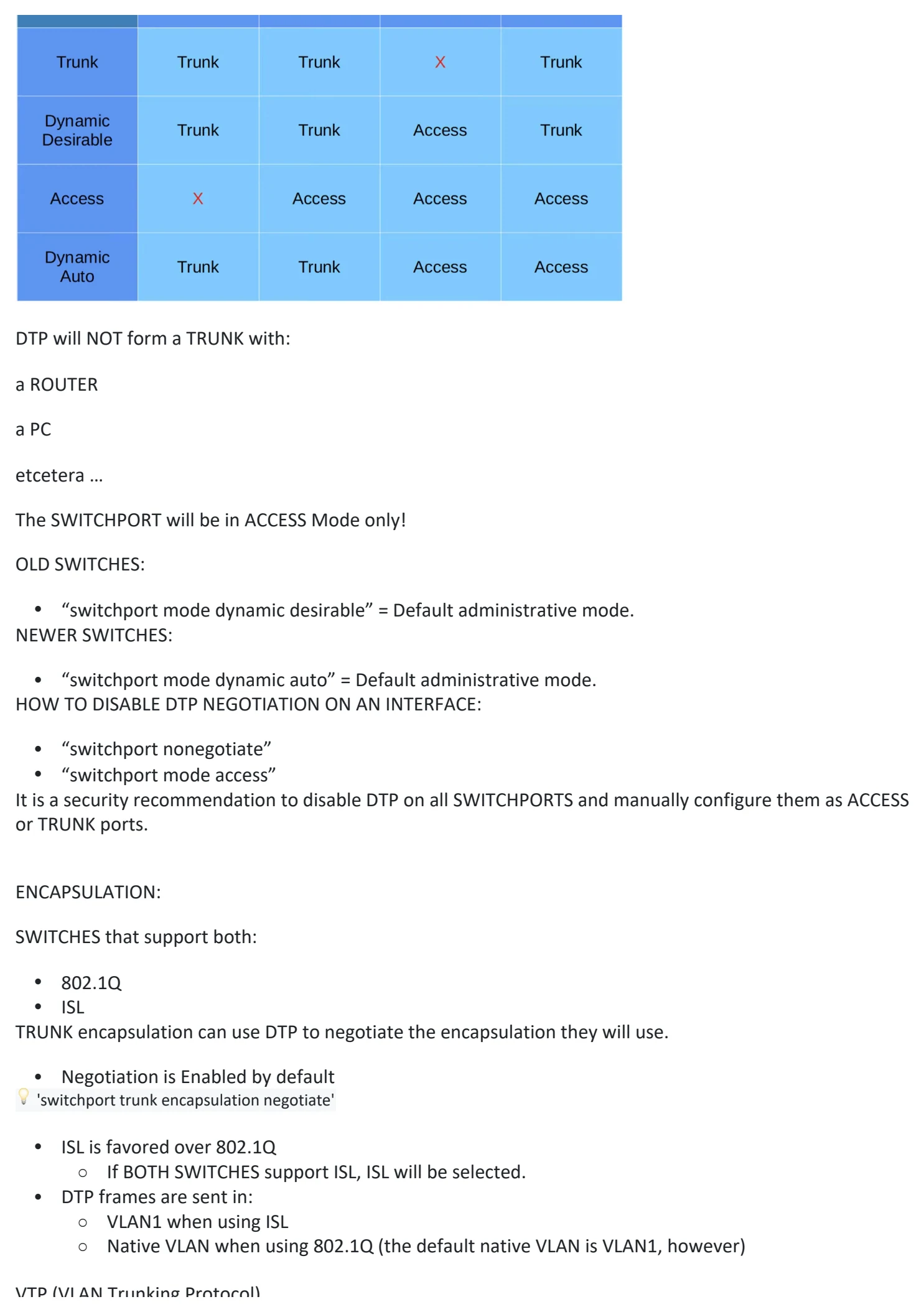
• Will form a TRUNK if connected to another SWITCHPORT in the following modes:
○ “switchport mode trunk”
○ “switchport mode dynamic desirable”
○ “switchport mode dynamic auto”
HOWEVER … if the other interface is set to “static access” (ACCESS mode), it will NOT form a TRUNK, it will be
an ACCESS PORT
DYNAMIC AUTO:
• This MODE will NOT actively try to form a TRUNK with other Cisco SWITCHES
• Will form a TRUNK if connected SWTICH is actively trying to form a TRUNK.
• It will form a TRUNK with a SWITCHPORT in the following modes:
○ “switchport mode trunk”
○ “switchport mode dynamic desirable”
TRUNK to ACCESS connection will operate in a Mismatched Mode.
This configuration does NOT work and SHOULD result in an error. Traffic will NOT work.
TABLE SHOWING THE DIFFERENT MODES AND COMPATIBILITY IN FORMING A TRUNK
DTP will NOT form a TRUNK with:
a ROUTER
a PC
etcetera …
The SWITCHPORT will be in ACCESS Mode only!
OLD SWITCHES:
• “switchport mode dynamic desirable” = Default administrative mode.
NEWER SWITCHES:
• “switchport mode dynamic auto” = Default administrative mode.
HOW TO DISABLE DTP NEGOTIATION ON AN INTERFACE:
• “switchport nonegotiate”
• “switchport mode access”
It is a security recommendation to disable DTP on all SWITCHPORTS and manually configure them as ACCESS
or TRUNK ports.
ENCAPSULATION:
SWITCHES that support both:
• 802.1Q
• ISL
TRUNK encapsulation can use DTP to negotiate the encapsulation they will use.
• Negotiation is Enabled by default
💡 'switchport trunk encapsulation negotiate'
• ISL is favored over 802.1Q
○ If BOTH SWITCHES support ISL, ISL will be selected.
• DTP frames are sent in:
○ VLAN1 when using ISL
○ Native VLAN when using 802.1Q (the default native VLAN is VLAN1, however)
VTP (VLAN Trunking Protocol)
In Privileged EXEC mode:
💡 #show vtp status
• Protocol for configuring VLANs on a Central SWITCH
○ A SERVER that other SWITCHES synch. to (auto configuring by connection)
• Other switches (VTP CLIENTS) will synchronize their VLAN database to the SERVER
• Designed for large networks with many VLANs (reduces manual configuration)
• RARELY used. Recommended you DO NOT USE it
• There are THREE VTP Versions :
○ v1
§ Does NOT supports Extended VLAN Range 1006-4094
○ v2
§ Does NOT supports Extended VLAN Range 1006-4094
§ Supports Token Ring VLANs ; otherwise similar to V1
○ v3
§ Supports Extended VLAN Range 1006-4094
§ CLIENTS store VLAN dBase in NVRAM
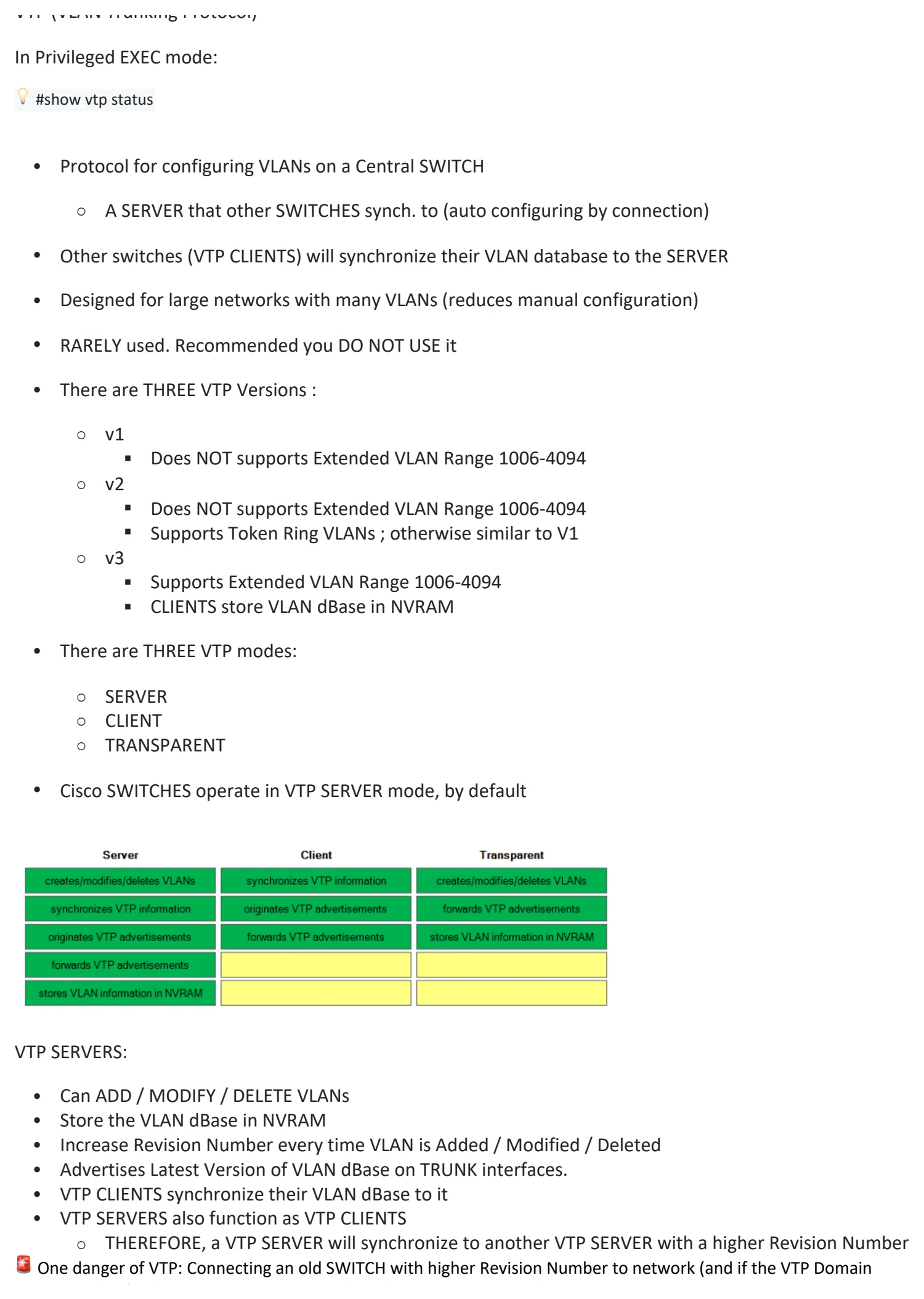
• There are THREE VTP modes:
○ SERVER
○ CLIENT
○ TRANSPARENT
• Cisco SWITCHES operate in VTP SERVER mode, by default
VTP SERVERS:
• Can ADD / MODIFY / DELETE VLANs
• Store the VLAN dBase in NVRAM
• Increase Revision Number every time VLAN is Added / Modified / Deleted
• Advertises Latest Version of VLAN dBase on TRUNK interfaces.
• VTP CLIENTS synchronize their VLAN dBase to it
• VTP SERVERS also function as VTP CLIENTS
○ THEREFORE, a VTP SERVER will synchronize to another VTP SERVER with a higher Revision Number
🚨 One danger of VTP: Connecting an old SWITCH with higher Revision Number to network (and if the VTP Domain
Name matches), all SWITCHES in Domain will synchronize their VLAN dBase to SWITCH
VTP CLIENTS:
💡 (config)# vtp mode client
• Cannot Add / Modify / Delete VLANs
• Does NOT store the VLAN database in NVRAM
○ VTP v3 CLIENTS DO
• Will synchronize their VLAN dBase to the SERVER with the highest version number in their VTP Domain
• Advertise their VLAN dBase and forward VTP Advertisements to other CLIENTS over TRUNK Ports
VTP TRANSPARENT MODE:
💡 (config)# vtp mode transparent
• Does NOT participate in VTP Domain (does NOT sync VLAN database)
• Maintains own VLAN dBase in NVRAM.
• Can Add / Modify / Delete VLANs
• Won’t Advertise to other SWITCHES
• Will forward VTP advertisements to SWITCHES in the same Domain as it.
VTP DOMAINS
If a SWITCH with no VTP Domain (Domain NULL) receives a VTP advertisement with a VTP Domain name, it will
automatically join that VTP Domain
If a SWITCH receives a VTP advertisement in the same VTP domain with a higher revision number, it will
update it’s VLAN database to match
REVISION NUMBERS:
There are TWO ways to RESET a REVISION NUMBER to 0:
• Change VTP Domain to an unused Domain
• Change VTP mode to TRANSPARENT
VTP VERSION NUMBER
💡 (config)#vtp version <version number>
Changing the Version # will force sync/update all connected SWITCHES to the latest Version #

Day 19 - DTP / VTP (Not in Syllabus)
Wednesday, August 26, 2026 5:05 PM
19. DTP / VTP (Not in Syllabus)
DTP (Dynamic Trunking Protocol)
• Protocol that allows SWITCHES to negotiate the status of their SWITCHPORTS, without manual
configuration, to be:
○ ACCESS PORTS
○ TRUNK PORTS
• DTP is ENABLED by default on all Cisco SWITCH interfaces
We’ve been manually configuring SWITCHPORTS using :
• “switchport mode access”
• “switchport mode trunk”
💡 'show interfaces <interface-id> switchport' will show you a switchport’s settings.
For security purposes, manual configuration is recommended. DTP should be disabled on ALL SWITCHPORTS
DYNAMIC DESIRABLE:
• This MODE will actively try to form a TRUNK with other Cisco SWITCHES.
• Will form a TRUNK if connected to another SWITCHPORT in the following modes:
○ “switchport mode trunk”
○ “switchport mode dynamic desirable”
○ “switchport mode dynamic auto”
HOWEVER … if the other interface is set to “static access” (ACCESS mode), it will NOT form a TRUNK, it will be
an ACCESS PORT
DYNAMIC AUTO:
• This MODE will NOT actively try to form a TRUNK with other Cisco SWITCHES
• Will form a TRUNK if connected SWTICH is actively trying to form a TRUNK.
• It will form a TRUNK with a SWITCHPORT in the following modes:
○ “switchport mode trunk”
○ “switchport mode dynamic desirable”
TRUNK to ACCESS connection will operate in a Mismatched Mode.
This configuration does NOT work and SHOULD result in an error. Traffic will NOT work.
TABLE SHOWING THE DIFFERENT MODES AND COMPATIBILITY IN FORMING A TRUNK
DTP will NOT form a TRUNK with:
a ROUTER
a PC
etcetera …
The SWITCHPORT will be in ACCESS Mode only!
OLD SWITCHES:
• “switchport mode dynamic desirable” = Default administrative mode.
NEWER SWITCHES:
• “switchport mode dynamic auto” = Default administrative mode.
HOW TO DISABLE DTP NEGOTIATION ON AN INTERFACE:
• “switchport nonegotiate”
• “switchport mode access”
It is a security recommendation to disable DTP on all SWITCHPORTS and manually configure them as ACCESS
or TRUNK ports.
ENCAPSULATION:
SWITCHES that support both:
• 802.1Q
• ISL
TRUNK encapsulation can use DTP to negotiate the encapsulation they will use.
• Negotiation is Enabled by default
💡 'switchport trunk encapsulation negotiate'
• ISL is favored over 802.1Q
○ If BOTH SWITCHES support ISL, ISL will be selected.
• DTP frames are sent in:
○ VLAN1 when using ISL
○ Native VLAN when using 802.1Q (the default native VLAN is VLAN1, however)
VTP (VLAN Trunking Protocol)
In Privileged EXEC mode:
💡 #show vtp status
• Protocol for configuring VLANs on a Central SWITCH
○ A SERVER that other SWITCHES synch. to (auto configuring by connection)
• Other switches (VTP CLIENTS) will synchronize their VLAN database to the SERVER
• Designed for large networks with many VLANs (reduces manual configuration)
• RARELY used. Recommended you DO NOT USE it
• There are THREE VTP Versions :
○ v1
§ Does NOT supports Extended VLAN Range 1006-4094
○ v2
§ Does NOT supports Extended VLAN Range 1006-4094
§ Supports Token Ring VLANs ; otherwise similar to V1
○ v3
§ Supports Extended VLAN Range 1006-4094
§ CLIENTS store VLAN dBase in NVRAM
• There are THREE VTP modes:
○ SERVER
○ CLIENT
○ TRANSPARENT
• Cisco SWITCHES operate in VTP SERVER mode, by default
VTP SERVERS:
• Can ADD / MODIFY / DELETE VLANs
• Store the VLAN dBase in NVRAM
• Increase Revision Number every time VLAN is Added / Modified / Deleted
• Advertises Latest Version of VLAN dBase on TRUNK interfaces.
• VTP CLIENTS synchronize their VLAN dBase to it
• VTP SERVERS also function as VTP CLIENTS
○ THEREFORE, a VTP SERVER will synchronize to another VTP SERVER with a higher Revision Number
🚨 One danger of VTP: Connecting an old SWITCH with higher Revision Number to network (and if the VTP Domain
Name matches), all SWITCHES in Domain will synchronize their VLAN dBase to SWITCH
VTP CLIENTS:
💡 (config)# vtp mode client
• Cannot Add / Modify / Delete VLANs
• Does NOT store the VLAN database in NVRAM
○ VTP v3 CLIENTS DO
• Will synchronize their VLAN dBase to the SERVER with the highest version number in their VTP Domain
• Advertise their VLAN dBase and forward VTP Advertisements to other CLIENTS over TRUNK Ports
VTP TRANSPARENT MODE:
💡 (config)# vtp mode transparent
• Does NOT participate in VTP Domain (does NOT sync VLAN database)
• Maintains own VLAN dBase in NVRAM.
• Can Add / Modify / Delete VLANs
• Won’t Advertise to other SWITCHES
• Will forward VTP advertisements to SWITCHES in the same Domain as it.
VTP DOMAINS
If a SWITCH with no VTP Domain (Domain NULL) receives a VTP advertisement with a VTP Domain name, it will
automatically join that VTP Domain
If a SWITCH receives a VTP advertisement in the same VTP domain with a higher revision number, it will
update it’s VLAN database to match
REVISION NUMBERS:
There are TWO ways to RESET a REVISION NUMBER to 0:
• Change VTP Domain to an unused Domain
• Change VTP mode to TRANSPARENT
VTP VERSION NUMBER
💡 (config)#vtp version <version number>
Changing the Version # will force sync/update all connected SWITCHES to the latest Version #

Day 19 - DTP / VTP (Not in Syllabus)
Wednesday, August 26, 2026 5:05 PM
19. DTP / VTP (Not in Syllabus)
DTP (Dynamic Trunking Protocol)
• Protocol that allows SWITCHES to negotiate the status of their SWITCHPORTS, without manual
configuration, to be:
○ ACCESS PORTS
○ TRUNK PORTS
• DTP is ENABLED by default on all Cisco SWITCH interfaces
We’ve been manually configuring SWITCHPORTS using :
• “switchport mode access”
• “switchport mode trunk”
💡 'show interfaces <interface-id> switchport' will show you a switchport’s settings.
For security purposes, manual configuration is recommended. DTP should be disabled on ALL SWITCHPORTS
DYNAMIC DESIRABLE:
• This MODE will actively try to form a TRUNK with other Cisco SWITCHES.
• Will form a TRUNK if connected to another SWITCHPORT in the following modes:
○ “switchport mode trunk”
○ “switchport mode dynamic desirable”
○ “switchport mode dynamic auto”
HOWEVER … if the other interface is set to “static access” (ACCESS mode), it will NOT form a TRUNK, it will be
an ACCESS PORT
DYNAMIC AUTO:
• This MODE will NOT actively try to form a TRUNK with other Cisco SWITCHES
• Will form a TRUNK if connected SWTICH is actively trying to form a TRUNK.
• It will form a TRUNK with a SWITCHPORT in the following modes:
○ “switchport mode trunk”
○ “switchport mode dynamic desirable”
TRUNK to ACCESS connection will operate in a Mismatched Mode.
This configuration does NOT work and SHOULD result in an error. Traffic will NOT work.
TABLE SHOWING THE DIFFERENT MODES AND COMPATIBILITY IN FORMING A TRUNK
DTP will NOT form a TRUNK with:
a ROUTER
a PC
etcetera …
The SWITCHPORT will be in ACCESS Mode only!
OLD SWITCHES:
• “switchport mode dynamic desirable” = Default administrative mode.
NEWER SWITCHES:
• “switchport mode dynamic auto” = Default administrative mode.
HOW TO DISABLE DTP NEGOTIATION ON AN INTERFACE:
• “switchport nonegotiate”
• “switchport mode access”
It is a security recommendation to disable DTP on all SWITCHPORTS and manually configure them as ACCESS
or TRUNK ports.
ENCAPSULATION:
SWITCHES that support both:
• 802.1Q
• ISL
TRUNK encapsulation can use DTP to negotiate the encapsulation they will use.
• Negotiation is Enabled by default
💡 'switchport trunk encapsulation negotiate'
• ISL is favored over 802.1Q
○ If BOTH SWITCHES support ISL, ISL will be selected.
• DTP frames are sent in:
○ VLAN1 when using ISL
○ Native VLAN when using 802.1Q (the default native VLAN is VLAN1, however)
VTP (VLAN Trunking Protocol)
In Privileged EXEC mode:
💡 #show vtp status
• Protocol for configuring VLANs on a Central SWITCH
○ A SERVER that other SWITCHES synch. to (auto configuring by connection)
• Other switches (VTP CLIENTS) will synchronize their VLAN database to the SERVER
• Designed for large networks with many VLANs (reduces manual configuration)
• RARELY used. Recommended you DO NOT USE it
• There are THREE VTP Versions :
○ v1
§ Does NOT supports Extended VLAN Range 1006-4094
○ v2
§ Does NOT supports Extended VLAN Range 1006-4094
§ Supports Token Ring VLANs ; otherwise similar to V1
○ v3
§ Supports Extended VLAN Range 1006-4094
§ CLIENTS store VLAN dBase in NVRAM
• There are THREE VTP modes:
○ SERVER
○ CLIENT
○ TRANSPARENT
• Cisco SWITCHES operate in VTP SERVER mode, by default
VTP SERVERS:
• Can ADD / MODIFY / DELETE VLANs
• Store the VLAN dBase in NVRAM
• Increase Revision Number every time VLAN is Added / Modified / Deleted
• Advertises Latest Version of VLAN dBase on TRUNK interfaces.
• VTP CLIENTS synchronize their VLAN dBase to it
• VTP SERVERS also function as VTP CLIENTS
○ THEREFORE, a VTP SERVER will synchronize to another VTP SERVER with a higher Revision Number
🚨 One danger of VTP: Connecting an old SWITCH with higher Revision Number to network (and if the VTP Domain
Name matches), all SWITCHES in Domain will synchronize their VLAN dBase to SWITCH
VTP CLIENTS:
💡 (config)# vtp mode client
• Cannot Add / Modify / Delete VLANs
• Does NOT store the VLAN database in NVRAM
○ VTP v3 CLIENTS DO
• Will synchronize their VLAN dBase to the SERVER with the highest version number in their VTP Domain
• Advertise their VLAN dBase and forward VTP Advertisements to other CLIENTS over TRUNK Ports
VTP TRANSPARENT MODE:
💡 (config)# vtp mode transparent
• Does NOT participate in VTP Domain (does NOT sync VLAN database)
• Maintains own VLAN dBase in NVRAM.
• Can Add / Modify / Delete VLANs
• Won’t Advertise to other SWITCHES
• Will forward VTP advertisements to SWITCHES in the same Domain as it.
VTP DOMAINS
If a SWITCH with no VTP Domain (Domain NULL) receives a VTP advertisement with a VTP Domain name, it will
automatically join that VTP Domain
If a SWITCH receives a VTP advertisement in the same VTP domain with a higher revision number, it will
update it’s VLAN database to match
REVISION NUMBERS:
There are TWO ways to RESET a REVISION NUMBER to 0:
• Change VTP Domain to an unused Domain
• Change VTP mode to TRANSPARENT
VTP VERSION NUMBER
💡 (config)#vtp version <version number>
Changing the Version # will force sync/update all connected SWITCHES to the latest Version #

Day 19 - DTP / VTP (Not in Syllabus)
Wednesday, August 26, 2026 5:05 PM
19. DTP / VTP (Not in Syllabus)
DTP (Dynamic Trunking Protocol)
• Protocol that allows SWITCHES to negotiate the status of their SWITCHPORTS, without manual
configuration, to be:
○ ACCESS PORTS
○ TRUNK PORTS
• DTP is ENABLED by default on all Cisco SWITCH interfaces
We’ve been manually configuring SWITCHPORTS using :
• “switchport mode access”
• “switchport mode trunk”
💡 'show interfaces <interface-id> switchport' will show you a switchport’s settings.
For security purposes, manual configuration is recommended. DTP should be disabled on ALL SWITCHPORTS
DYNAMIC DESIRABLE:
• This MODE will actively try to form a TRUNK with other Cisco SWITCHES.
• Will form a TRUNK if connected to another SWITCHPORT in the following modes:
○ “switchport mode trunk”
○ “switchport mode dynamic desirable”
○ “switchport mode dynamic auto”
HOWEVER … if the other interface is set to “static access” (ACCESS mode), it will NOT form a TRUNK, it will be
an ACCESS PORT
DYNAMIC AUTO:
• This MODE will NOT actively try to form a TRUNK with other Cisco SWITCHES
• Will form a TRUNK if connected SWTICH is actively trying to form a TRUNK.
• It will form a TRUNK with a SWITCHPORT in the following modes:
○ “switchport mode trunk”
○ “switchport mode dynamic desirable”
TRUNK to ACCESS connection will operate in a Mismatched Mode.
This configuration does NOT work and SHOULD result in an error. Traffic will NOT work.
TABLE SHOWING THE DIFFERENT MODES AND COMPATIBILITY IN FORMING A TRUNK
DTP will NOT form a TRUNK with:
a ROUTER
a PC
etcetera …
The SWITCHPORT will be in ACCESS Mode only!
OLD SWITCHES:
• “switchport mode dynamic desirable” = Default administrative mode.
NEWER SWITCHES:
• “switchport mode dynamic auto” = Default administrative mode.
HOW TO DISABLE DTP NEGOTIATION ON AN INTERFACE:
• “switchport nonegotiate”
• “switchport mode access”
It is a security recommendation to disable DTP on all SWITCHPORTS and manually configure them as ACCESS
or TRUNK ports.
ENCAPSULATION:
SWITCHES that support both:
• 802.1Q
• ISL
TRUNK encapsulation can use DTP to negotiate the encapsulation they will use.
• Negotiation is Enabled by default
💡 'switchport trunk encapsulation negotiate'
• ISL is favored over 802.1Q
○ If BOTH SWITCHES support ISL, ISL will be selected.
• DTP frames are sent in:
○ VLAN1 when using ISL
○ Native VLAN when using 802.1Q (the default native VLAN is VLAN1, however)
VTP (VLAN Trunking Protocol)
In Privileged EXEC mode:
💡 #show vtp status
• Protocol for configuring VLANs on a Central SWITCH
○ A SERVER that other SWITCHES synch. to (auto configuring by connection)
• Other switches (VTP CLIENTS) will synchronize their VLAN database to the SERVER
• Designed for large networks with many VLANs (reduces manual configuration)
• RARELY used. Recommended you DO NOT USE it
• There are THREE VTP Versions :
○ v1
§ Does NOT supports Extended VLAN Range 1006-4094
○ v2
§ Does NOT supports Extended VLAN Range 1006-4094
§ Supports Token Ring VLANs ; otherwise similar to V1
○ v3
§ Supports Extended VLAN Range 1006-4094
§ CLIENTS store VLAN dBase in NVRAM
• There are THREE VTP modes:
○ SERVER
○ CLIENT
○ TRANSPARENT
• Cisco SWITCHES operate in VTP SERVER mode, by default
VTP SERVERS:
• Can ADD / MODIFY / DELETE VLANs
• Store the VLAN dBase in NVRAM
• Increase Revision Number every time VLAN is Added / Modified / Deleted
• Advertises Latest Version of VLAN dBase on TRUNK interfaces.
• VTP CLIENTS synchronize their VLAN dBase to it
• VTP SERVERS also function as VTP CLIENTS
○ THEREFORE, a VTP SERVER will synchronize to another VTP SERVER with a higher Revision Number
🚨 One danger of VTP: Connecting an old SWITCH with higher Revision Number to network (and if the VTP Domain
Name matches), all SWITCHES in Domain will synchronize their VLAN dBase to SWITCH
VTP CLIENTS:
💡 (config)# vtp mode client
• Cannot Add / Modify / Delete VLANs
• Does NOT store the VLAN database in NVRAM
○ VTP v3 CLIENTS DO
• Will synchronize their VLAN dBase to the SERVER with the highest version number in their VTP Domain
• Advertise their VLAN dBase and forward VTP Advertisements to other CLIENTS over TRUNK Ports
VTP TRANSPARENT MODE:
💡 (config)# vtp mode transparent
• Does NOT participate in VTP Domain (does NOT sync VLAN database)
• Maintains own VLAN dBase in NVRAM.
• Can Add / Modify / Delete VLANs
• Won’t Advertise to other SWITCHES
• Will forward VTP advertisements to SWITCHES in the same Domain as it.
VTP DOMAINS
If a SWITCH with no VTP Domain (Domain NULL) receives a VTP advertisement with a VTP Domain name, it will
automatically join that VTP Domain
If a SWITCH receives a VTP advertisement in the same VTP domain with a higher revision number, it will
update it’s VLAN database to match
REVISION NUMBERS:
There are TWO ways to RESET a REVISION NUMBER to 0:
• Change VTP Domain to an unused Domain
• Change VTP mode to TRANSPARENT
VTP VERSION NUMBER
💡 (config)#vtp version <version number>
Changing the Version # will force sync/update all connected SWITCHES to the latest Version #