
Day 08 / 63 · Network foundations
IPv4 Addressing (pt 2)
Study notes based primarily on Jeremy’s IT Lab CCNA learning videos. Credit to Jeremy’s IT Lab for the source lessons and diagrams.
IPv4 Addressing (pt 2)
Download original PDF
Text view — IPv4 Addressing (pt 2)
Extracted from the original export. Diagrams and some formatting appear in the notes above.
Day 8 - IPv4 Addressing (pt 2)
Saturday, August 22, 2026 2:50 PM
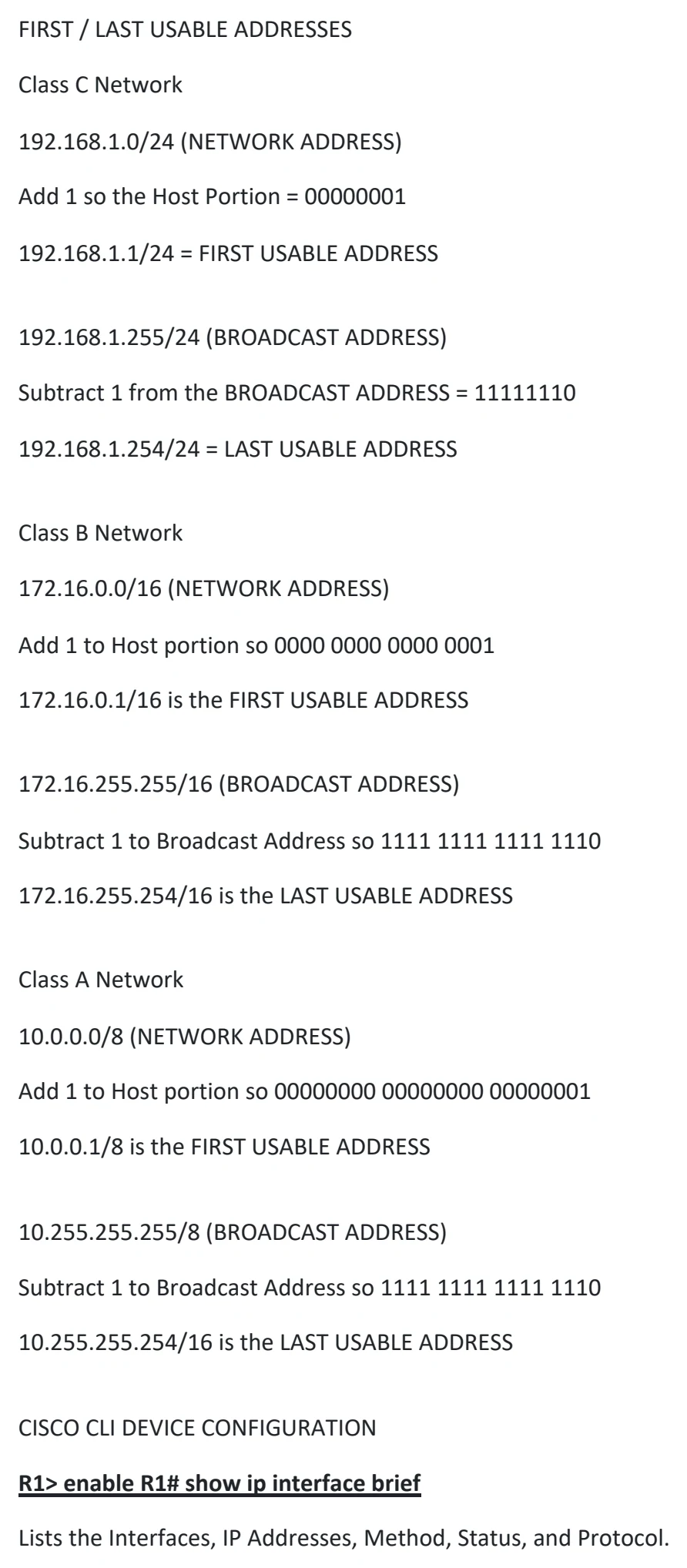
8. IPv4 ADDRESSING : PART 2
MAXIMUM HOSTS PER NETWORK
Let's take a Class C Network:
192.168.1.0/24
(gives a range of 0 ---> 255)
Said another way, the HOST portion (the .0) is equal to 8 bits so...
Host portion = 8 bits = 2^8 = 256
HOWEVER, since the Network Address (Network ID)
192.168.1.0 is Reserved
AND
192.168.1.255 (BROADCAST ADDRESS) is ALSO reserved.
The MAXIMUM Hosts per Network = 2^8-2 = 254 hosts
What about a Class B Network ?
172.16.0.0/16 ----> 172.16.255.255/16
Host portion = 16 bits = 2^16 = 65,536
Maximum hosts per network = 2^16-2 = 65,534 hosts
What about a Class A Network ?
10.0.0.0/8 -------------> 10.255.255.255/8
Host portion = 24 bits = 2^24 = 16,777,216
Maximum hosts per network = 2^24-2 = 16,777,214 hosts
THEREFORE:
The formula for calculating the number of HOSTS on a network is:
2 ^ N - 2 (2 to the power of N - 2)
where N = number of HOST bits
FIRST / LAST USABLE ADDRESSES
Class C Network
192.168.1.0/24 (NETWORK ADDRESS)
Add 1 so the Host Portion = 00000001
192.168.1.1/24 = FIRST USABLE ADDRESS
192.168.1.255/24 (BROADCAST ADDRESS)
Subtract 1 from the BROADCAST ADDRESS = 11111110
192.168.1.254/24 = LAST USABLE ADDRESS
Class B Network
172.16.0.0/16 (NETWORK ADDRESS)
Add 1 to Host portion so 0000 0000 0000 0001
172.16.0.1/16 is the FIRST USABLE ADDRESS
172.16.255.255/16 (BROADCAST ADDRESS)
Subtract 1 to Broadcast Address so 1111 1111 1111 1110
172.16.255.254/16 is the LAST USABLE ADDRESS
Class A Network
10.0.0.0/8 (NETWORK ADDRESS)
Add 1 to Host portion so 00000000 00000000 00000001
10.0.0.1/8 is the FIRST USABLE ADDRESS
10.255.255.255/8 (BROADCAST ADDRESS)
Subtract 1 to Broadcast Address so 1111 1111 1111 1110
10.255.255.254/16 is the LAST USABLE ADDRESS
CISCO CLI DEVICE CONFIGURATION
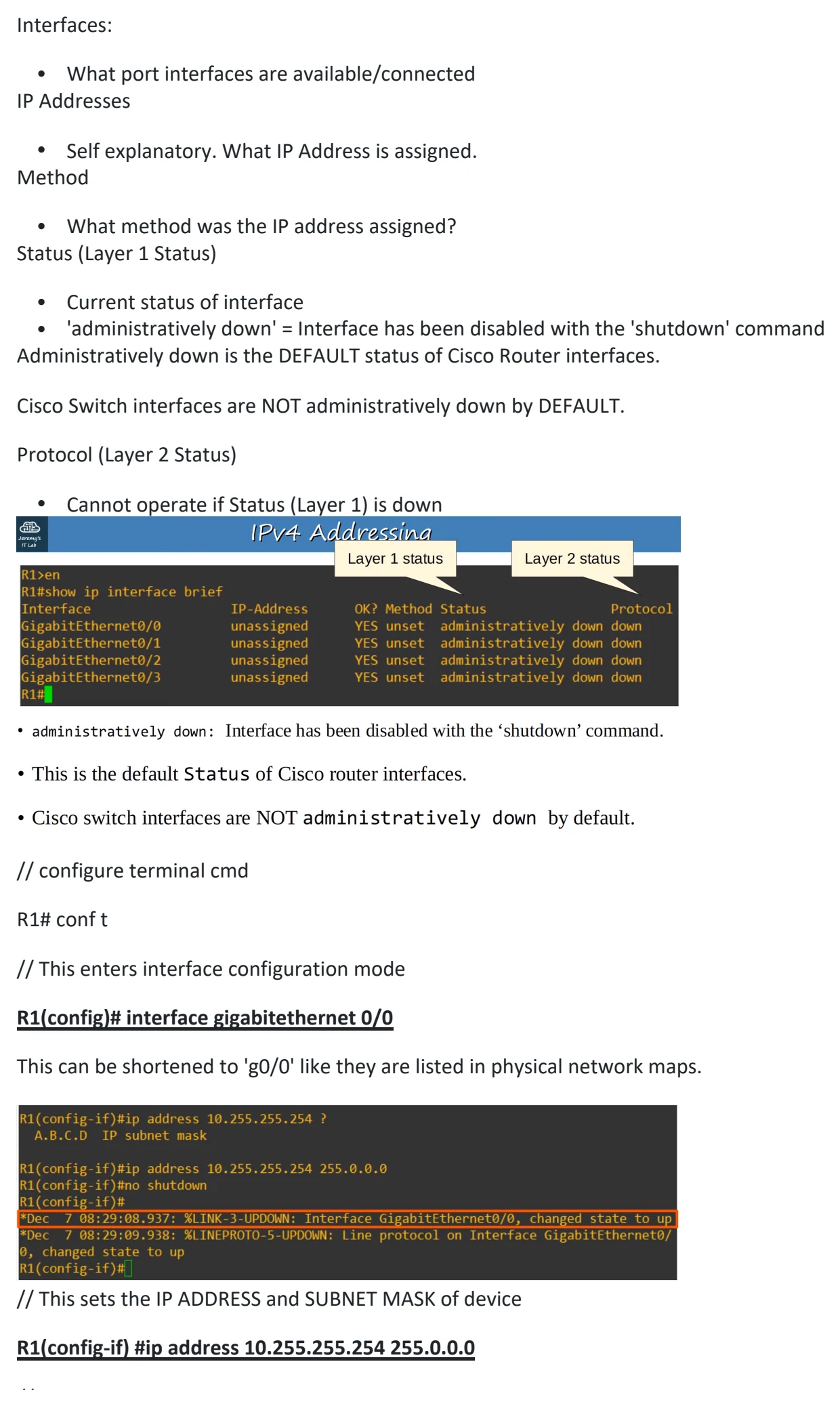
R1> enable R1# show ip interface brief
Lists the Interfaces, IP Addresses, Method, Status, and Protocol.
Interfaces:
• What port interfaces are available/connected
IP Addresses
• Self explanatory. What IP Address is assigned.
Method
• What method was the IP address assigned?
Status (Layer 1 Status)
• Current status of interface
• 'administratively down' = Interface has been disabled with the 'shutdown' command
Administratively down is the DEFAULT status of Cisco Router interfaces.
Cisco Switch interfaces are NOT administratively down by DEFAULT.
Protocol (Layer 2 Status)
• Cannot operate if Status (Layer 1) is down
// configure terminal cmd
R1# conf t
// This enters interface configuration mode
R1(config)# interface gigabitethernet 0/0
This can be shortened to 'g0/0' like they are listed in physical network maps.
// This sets the IP ADDRESS and SUBNET MASK of device
R1(config-if) #ip address 10.255.255.254 255.0.0.0
// This enables the device
R1(config-if) #no shutdown
Two messages should appear showing the state has changed to 'up' (Status). Second message should show
line protocol is now 'up' (Protocol).
// 'do' allows you to run a Privileged EXEC command from outside the mode.
R1(config-if) #do show ip interface brief
Good to confirm that the device/interface you have configured is up and running.
More 'show' CLI Commands
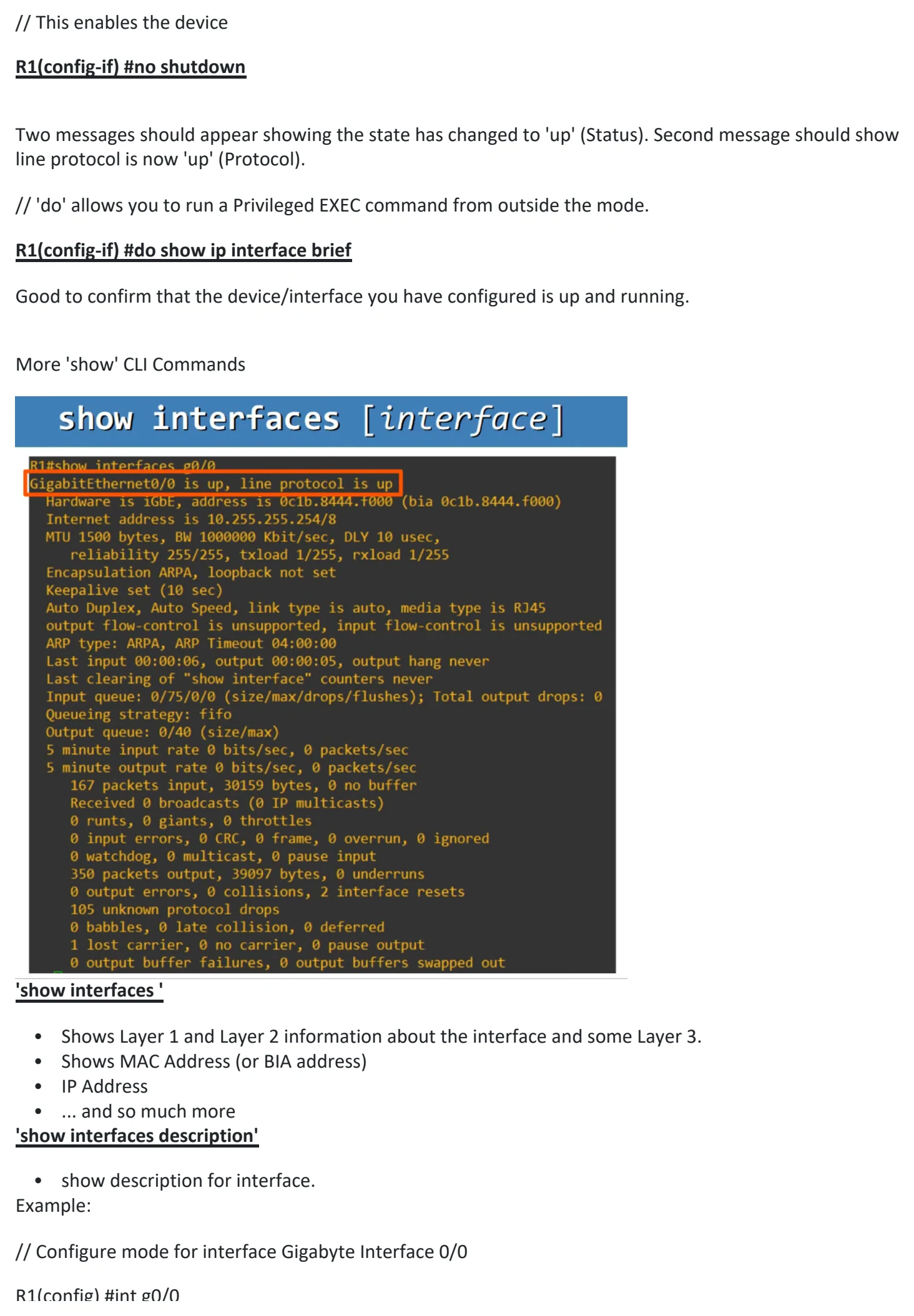
'show interfaces '
• Shows Layer 1 and Layer 2 information about the interface and some Layer 3.
• Shows MAC Address (or BIA address)
• IP Address
• ... and so much more
'show interfaces description'
• show description for interface.
Example:
// Configure mode for interface Gigabyte Interface 0/0
R1(config) #int g0/0
R1(config) #description ## to SW1 ##
This sets the 'Description' column to display:
Interface Description
Gi0/0 ## to SW1 ##

Day 8 - IPv4 Addressing (pt 2)
Saturday, August 22, 2026 2:50 PM
8. IPv4 ADDRESSING : PART 2
MAXIMUM HOSTS PER NETWORK
Let's take a Class C Network:
192.168.1.0/24
(gives a range of 0 ---> 255)
Said another way, the HOST portion (the .0) is equal to 8 bits so...
Host portion = 8 bits = 2^8 = 256
HOWEVER, since the Network Address (Network ID)
192.168.1.0 is Reserved
AND
192.168.1.255 (BROADCAST ADDRESS) is ALSO reserved.
The MAXIMUM Hosts per Network = 2^8-2 = 254 hosts
What about a Class B Network ?
172.16.0.0/16 ----> 172.16.255.255/16
Host portion = 16 bits = 2^16 = 65,536
Maximum hosts per network = 2^16-2 = 65,534 hosts
What about a Class A Network ?
10.0.0.0/8 -------------> 10.255.255.255/8
Host portion = 24 bits = 2^24 = 16,777,216
Maximum hosts per network = 2^24-2 = 16,777,214 hosts
THEREFORE:
The formula for calculating the number of HOSTS on a network is:
2 ^ N - 2 (2 to the power of N - 2)
where N = number of HOST bits
FIRST / LAST USABLE ADDRESSES
Class C Network
192.168.1.0/24 (NETWORK ADDRESS)
Add 1 so the Host Portion = 00000001
192.168.1.1/24 = FIRST USABLE ADDRESS
192.168.1.255/24 (BROADCAST ADDRESS)
Subtract 1 from the BROADCAST ADDRESS = 11111110
192.168.1.254/24 = LAST USABLE ADDRESS
Class B Network
172.16.0.0/16 (NETWORK ADDRESS)
Add 1 to Host portion so 0000 0000 0000 0001
172.16.0.1/16 is the FIRST USABLE ADDRESS
172.16.255.255/16 (BROADCAST ADDRESS)
Subtract 1 to Broadcast Address so 1111 1111 1111 1110
172.16.255.254/16 is the LAST USABLE ADDRESS
Class A Network
10.0.0.0/8 (NETWORK ADDRESS)
Add 1 to Host portion so 00000000 00000000 00000001
10.0.0.1/8 is the FIRST USABLE ADDRESS
10.255.255.255/8 (BROADCAST ADDRESS)
Subtract 1 to Broadcast Address so 1111 1111 1111 1110
10.255.255.254/16 is the LAST USABLE ADDRESS
CISCO CLI DEVICE CONFIGURATION
R1> enable R1# show ip interface brief
Lists the Interfaces, IP Addresses, Method, Status, and Protocol.
Interfaces:
• What port interfaces are available/connected
IP Addresses
• Self explanatory. What IP Address is assigned.
Method
• What method was the IP address assigned?
Status (Layer 1 Status)
• Current status of interface
• 'administratively down' = Interface has been disabled with the 'shutdown' command
Administratively down is the DEFAULT status of Cisco Router interfaces.
Cisco Switch interfaces are NOT administratively down by DEFAULT.
Protocol (Layer 2 Status)
• Cannot operate if Status (Layer 1) is down
// configure terminal cmd
R1# conf t
// This enters interface configuration mode
R1(config)# interface gigabitethernet 0/0
This can be shortened to 'g0/0' like they are listed in physical network maps.
// This sets the IP ADDRESS and SUBNET MASK of device
R1(config-if) #ip address 10.255.255.254 255.0.0.0
// This enables the device
R1(config-if) #no shutdown
Two messages should appear showing the state has changed to 'up' (Status). Second message should show
line protocol is now 'up' (Protocol).
// 'do' allows you to run a Privileged EXEC command from outside the mode.
R1(config-if) #do show ip interface brief
Good to confirm that the device/interface you have configured is up and running.
More 'show' CLI Commands
'show interfaces '
• Shows Layer 1 and Layer 2 information about the interface and some Layer 3.
• Shows MAC Address (or BIA address)
• IP Address
• ... and so much more
'show interfaces description'
• show description for interface.
Example:
// Configure mode for interface Gigabyte Interface 0/0
R1(config) #int g0/0
R1(config) #description ## to SW1 ##
This sets the 'Description' column to display:
Interface Description
Gi0/0 ## to SW1 ##

Day 8 - IPv4 Addressing (pt 2)
Saturday, August 22, 2026 2:50 PM
8. IPv4 ADDRESSING : PART 2
MAXIMUM HOSTS PER NETWORK
Let's take a Class C Network:
192.168.1.0/24
(gives a range of 0 ---> 255)
Said another way, the HOST portion (the .0) is equal to 8 bits so...
Host portion = 8 bits = 2^8 = 256
HOWEVER, since the Network Address (Network ID)
192.168.1.0 is Reserved
AND
192.168.1.255 (BROADCAST ADDRESS) is ALSO reserved.
The MAXIMUM Hosts per Network = 2^8-2 = 254 hosts
What about a Class B Network ?
172.16.0.0/16 ----> 172.16.255.255/16
Host portion = 16 bits = 2^16 = 65,536
Maximum hosts per network = 2^16-2 = 65,534 hosts
What about a Class A Network ?
10.0.0.0/8 -------------> 10.255.255.255/8
Host portion = 24 bits = 2^24 = 16,777,216
Maximum hosts per network = 2^24-2 = 16,777,214 hosts
THEREFORE:
The formula for calculating the number of HOSTS on a network is:
2 ^ N - 2 (2 to the power of N - 2)
where N = number of HOST bits
FIRST / LAST USABLE ADDRESSES
Class C Network
192.168.1.0/24 (NETWORK ADDRESS)
Add 1 so the Host Portion = 00000001
192.168.1.1/24 = FIRST USABLE ADDRESS
192.168.1.255/24 (BROADCAST ADDRESS)
Subtract 1 from the BROADCAST ADDRESS = 11111110
192.168.1.254/24 = LAST USABLE ADDRESS
Class B Network
172.16.0.0/16 (NETWORK ADDRESS)
Add 1 to Host portion so 0000 0000 0000 0001
172.16.0.1/16 is the FIRST USABLE ADDRESS
172.16.255.255/16 (BROADCAST ADDRESS)
Subtract 1 to Broadcast Address so 1111 1111 1111 1110
172.16.255.254/16 is the LAST USABLE ADDRESS
Class A Network
10.0.0.0/8 (NETWORK ADDRESS)
Add 1 to Host portion so 00000000 00000000 00000001
10.0.0.1/8 is the FIRST USABLE ADDRESS
10.255.255.255/8 (BROADCAST ADDRESS)
Subtract 1 to Broadcast Address so 1111 1111 1111 1110
10.255.255.254/16 is the LAST USABLE ADDRESS
CISCO CLI DEVICE CONFIGURATION
R1> enable R1# show ip interface brief
Lists the Interfaces, IP Addresses, Method, Status, and Protocol.
Interfaces:
• What port interfaces are available/connected
IP Addresses
• Self explanatory. What IP Address is assigned.
Method
• What method was the IP address assigned?
Status (Layer 1 Status)
• Current status of interface
• 'administratively down' = Interface has been disabled with the 'shutdown' command
Administratively down is the DEFAULT status of Cisco Router interfaces.
Cisco Switch interfaces are NOT administratively down by DEFAULT.
Protocol (Layer 2 Status)
• Cannot operate if Status (Layer 1) is down
// configure terminal cmd
R1# conf t
// This enters interface configuration mode
R1(config)# interface gigabitethernet 0/0
This can be shortened to 'g0/0' like they are listed in physical network maps.
// This sets the IP ADDRESS and SUBNET MASK of device
R1(config-if) #ip address 10.255.255.254 255.0.0.0
// This enables the device
R1(config-if) #no shutdown
Two messages should appear showing the state has changed to 'up' (Status). Second message should show
line protocol is now 'up' (Protocol).
// 'do' allows you to run a Privileged EXEC command from outside the mode.
R1(config-if) #do show ip interface brief
Good to confirm that the device/interface you have configured is up and running.
More 'show' CLI Commands
'show interfaces '
• Shows Layer 1 and Layer 2 information about the interface and some Layer 3.
• Shows MAC Address (or BIA address)
• IP Address
• ... and so much more
'show interfaces description'
• show description for interface.
Example:
// Configure mode for interface Gigabyte Interface 0/0
R1(config) #int g0/0
R1(config) #description ## to SW1 ##
This sets the 'Description' column to display:
Interface Description
Gi0/0 ## to SW1 ##

Day 8 - IPv4 Addressing (pt 2)
Saturday, August 22, 2026 2:50 PM
8. IPv4 ADDRESSING : PART 2
MAXIMUM HOSTS PER NETWORK
Let's take a Class C Network:
192.168.1.0/24
(gives a range of 0 ---> 255)
Said another way, the HOST portion (the .0) is equal to 8 bits so...
Host portion = 8 bits = 2^8 = 256
HOWEVER, since the Network Address (Network ID)
192.168.1.0 is Reserved
AND
192.168.1.255 (BROADCAST ADDRESS) is ALSO reserved.
The MAXIMUM Hosts per Network = 2^8-2 = 254 hosts
What about a Class B Network ?
172.16.0.0/16 ----> 172.16.255.255/16
Host portion = 16 bits = 2^16 = 65,536
Maximum hosts per network = 2^16-2 = 65,534 hosts
What about a Class A Network ?
10.0.0.0/8 -------------> 10.255.255.255/8
Host portion = 24 bits = 2^24 = 16,777,216
Maximum hosts per network = 2^24-2 = 16,777,214 hosts
THEREFORE:
The formula for calculating the number of HOSTS on a network is:
2 ^ N - 2 (2 to the power of N - 2)
where N = number of HOST bits
FIRST / LAST USABLE ADDRESSES
Class C Network
192.168.1.0/24 (NETWORK ADDRESS)
Add 1 so the Host Portion = 00000001
192.168.1.1/24 = FIRST USABLE ADDRESS
192.168.1.255/24 (BROADCAST ADDRESS)
Subtract 1 from the BROADCAST ADDRESS = 11111110
192.168.1.254/24 = LAST USABLE ADDRESS
Class B Network
172.16.0.0/16 (NETWORK ADDRESS)
Add 1 to Host portion so 0000 0000 0000 0001
172.16.0.1/16 is the FIRST USABLE ADDRESS
172.16.255.255/16 (BROADCAST ADDRESS)
Subtract 1 to Broadcast Address so 1111 1111 1111 1110
172.16.255.254/16 is the LAST USABLE ADDRESS
Class A Network
10.0.0.0/8 (NETWORK ADDRESS)
Add 1 to Host portion so 00000000 00000000 00000001
10.0.0.1/8 is the FIRST USABLE ADDRESS
10.255.255.255/8 (BROADCAST ADDRESS)
Subtract 1 to Broadcast Address so 1111 1111 1111 1110
10.255.255.254/16 is the LAST USABLE ADDRESS
CISCO CLI DEVICE CONFIGURATION
R1> enable R1# show ip interface brief
Lists the Interfaces, IP Addresses, Method, Status, and Protocol.
Interfaces:
• What port interfaces are available/connected
IP Addresses
• Self explanatory. What IP Address is assigned.
Method
• What method was the IP address assigned?
Status (Layer 1 Status)
• Current status of interface
• 'administratively down' = Interface has been disabled with the 'shutdown' command
Administratively down is the DEFAULT status of Cisco Router interfaces.
Cisco Switch interfaces are NOT administratively down by DEFAULT.
Protocol (Layer 2 Status)
• Cannot operate if Status (Layer 1) is down
// configure terminal cmd
R1# conf t
// This enters interface configuration mode
R1(config)# interface gigabitethernet 0/0
This can be shortened to 'g0/0' like they are listed in physical network maps.
// This sets the IP ADDRESS and SUBNET MASK of device
R1(config-if) #ip address 10.255.255.254 255.0.0.0
// This enables the device
R1(config-if) #no shutdown
Two messages should appear showing the state has changed to 'up' (Status). Second message should show
line protocol is now 'up' (Protocol).
// 'do' allows you to run a Privileged EXEC command from outside the mode.
R1(config-if) #do show ip interface brief
Good to confirm that the device/interface you have configured is up and running.
More 'show' CLI Commands
'show interfaces '
• Shows Layer 1 and Layer 2 information about the interface and some Layer 3.
• Shows MAC Address (or BIA address)
• IP Address
• ... and so much more
'show interfaces description'
• show description for interface.
Example:
// Configure mode for interface Gigabyte Interface 0/0
R1(config) #int g0/0
R1(config) #description ## to SW1 ##
This sets the 'Description' column to display:
Interface Description
Gi0/0 ## to SW1 ##

Day 8 - IPv4 Addressing (pt 2)
Saturday, August 22, 2026 2:50 PM
8. IPv4 ADDRESSING : PART 2
MAXIMUM HOSTS PER NETWORK
Let's take a Class C Network:
192.168.1.0/24
(gives a range of 0 ---> 255)
Said another way, the HOST portion (the .0) is equal to 8 bits so...
Host portion = 8 bits = 2^8 = 256
HOWEVER, since the Network Address (Network ID)
192.168.1.0 is Reserved
AND
192.168.1.255 (BROADCAST ADDRESS) is ALSO reserved.
The MAXIMUM Hosts per Network = 2^8-2 = 254 hosts
What about a Class B Network ?
172.16.0.0/16 ----> 172.16.255.255/16
Host portion = 16 bits = 2^16 = 65,536
Maximum hosts per network = 2^16-2 = 65,534 hosts
What about a Class A Network ?
10.0.0.0/8 -------------> 10.255.255.255/8
Host portion = 24 bits = 2^24 = 16,777,216
Maximum hosts per network = 2^24-2 = 16,777,214 hosts
THEREFORE:
The formula for calculating the number of HOSTS on a network is:
2 ^ N - 2 (2 to the power of N - 2)
where N = number of HOST bits
FIRST / LAST USABLE ADDRESSES
Class C Network
192.168.1.0/24 (NETWORK ADDRESS)
Add 1 so the Host Portion = 00000001
192.168.1.1/24 = FIRST USABLE ADDRESS
192.168.1.255/24 (BROADCAST ADDRESS)
Subtract 1 from the BROADCAST ADDRESS = 11111110
192.168.1.254/24 = LAST USABLE ADDRESS
Class B Network
172.16.0.0/16 (NETWORK ADDRESS)
Add 1 to Host portion so 0000 0000 0000 0001
172.16.0.1/16 is the FIRST USABLE ADDRESS
172.16.255.255/16 (BROADCAST ADDRESS)
Subtract 1 to Broadcast Address so 1111 1111 1111 1110
172.16.255.254/16 is the LAST USABLE ADDRESS
Class A Network
10.0.0.0/8 (NETWORK ADDRESS)
Add 1 to Host portion so 00000000 00000000 00000001
10.0.0.1/8 is the FIRST USABLE ADDRESS
10.255.255.255/8 (BROADCAST ADDRESS)
Subtract 1 to Broadcast Address so 1111 1111 1111 1110
10.255.255.254/16 is the LAST USABLE ADDRESS
CISCO CLI DEVICE CONFIGURATION
R1> enable R1# show ip interface brief
Lists the Interfaces, IP Addresses, Method, Status, and Protocol.
Interfaces:
• What port interfaces are available/connected
IP Addresses
• Self explanatory. What IP Address is assigned.
Method
• What method was the IP address assigned?
Status (Layer 1 Status)
• Current status of interface
• 'administratively down' = Interface has been disabled with the 'shutdown' command
Administratively down is the DEFAULT status of Cisco Router interfaces.
Cisco Switch interfaces are NOT administratively down by DEFAULT.
Protocol (Layer 2 Status)
• Cannot operate if Status (Layer 1) is down
// configure terminal cmd
R1# conf t
// This enters interface configuration mode
R1(config)# interface gigabitethernet 0/0
This can be shortened to 'g0/0' like they are listed in physical network maps.
// This sets the IP ADDRESS and SUBNET MASK of device
R1(config-if) #ip address 10.255.255.254 255.0.0.0
// This enables the device
R1(config-if) #no shutdown
Two messages should appear showing the state has changed to 'up' (Status). Second message should show
line protocol is now 'up' (Protocol).
// 'do' allows you to run a Privileged EXEC command from outside the mode.
R1(config-if) #do show ip interface brief
Good to confirm that the device/interface you have configured is up and running.
More 'show' CLI Commands
'show interfaces '
• Shows Layer 1 and Layer 2 information about the interface and some Layer 3.
• Shows MAC Address (or BIA address)
• IP Address
• ... and so much more
'show interfaces description'
• show description for interface.
Example:
// Configure mode for interface Gigabyte Interface 0/0
R1(config) #int g0/0
R1(config) #description ## to SW1 ##
This sets the 'Description' column to display:
Interface Description
Gi0/0 ## to SW1 ##