
Day 35 / 63 · Routing & addressing
Extended ACLs
Study notes based primarily on Jeremy’s IT Lab CCNA learning videos. Credit to Jeremy’s IT Lab for the source lessons and diagrams.
Extended ACLs
Download original PDF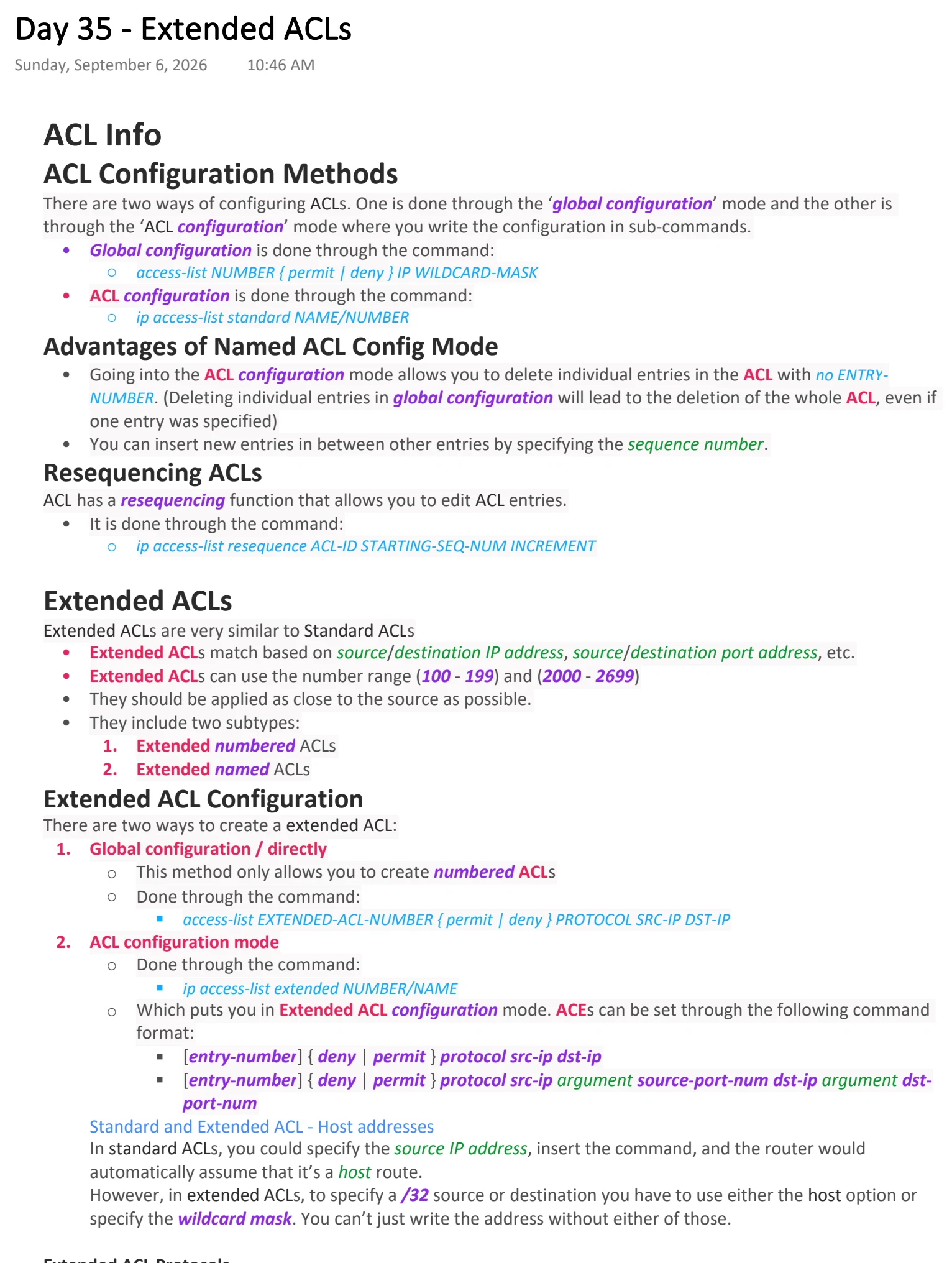
Text view — Extended ACLs
Extracted from the original export. Diagrams and some formatting appear in the notes above.
Day 35 - Extended ACLs
Sunday, September 6, 2026 10:46 AM
ACL Info
ACL Configuration Methods
There are two ways of configuring ACLs. One is done through the ‘global configuration’ mode and the other is
through the ‘ACL configuration’ mode where you write the configuration in sub-commands.
• Global configuration is done through the command:
○ access-list NUMBER { permit | deny } IP WILDCARD-MASK
• ACL configuration is done through the command:
○ ip access-list standard NAME/NUMBER
Advantages of Named ACL Config Mode
• Going into the ACL configuration mode allows you to delete individual entries in the ACL with no ENTRY-
NUMBER. (Deleting individual entries in global configuration will lead to the deletion of the whole ACL, even if
one entry was specified)
• You can insert new entries in between other entries by specifying the sequence number.
Resequencing ACLs
ACL has a resequencing function that allows you to edit ACL entries.
• It is done through the command:
○ ip access-list resequence ACL-ID STARTING-SEQ-NUM INCREMENT
Extended ACLs
Extended ACLs are very similar to Standard ACLs
• Extended ACLs match based on source/destination IP address, source/destination port address, etc.
• Extended ACLs can use the number range (100 - 199) and (2000 - 2699)
• They should be applied as close to the source as possible.
• They include two subtypes:
1. Extended numbered ACLs
2. Extended named ACLs
Extended ACL Configuration
There are two ways to create a extended ACL:
1. Global configuration / directly
○ This method only allows you to create numbered ACLs
○ Done through the command:
§ access-list EXTENDED-ACL-NUMBER { permit | deny } PROTOCOL SRC-IP DST-IP
2. ACL configuration mode
○ Done through the command:
§ ip access-list extended NUMBER/NAME
○ Which puts you in Extended ACL configuration mode. ACEs can be set through the following command
format:
§ [entry-number] { deny | permit } protocol src-ip dst-ip
§ [entry-number] { deny | permit } protocol src-ip argument source-port-num dst-ip argument dst-
port-num
Standard and Extended ACL - Host addresses
In standard ACLs, you could specify the source IP address, insert the command, and the router would
automatically assume that it’s a host route.
However, in extended ACLs, to specify a /32 source or destination you have to use either the host option or
specify the wildcard mask. You can’t just write the address without either of those.
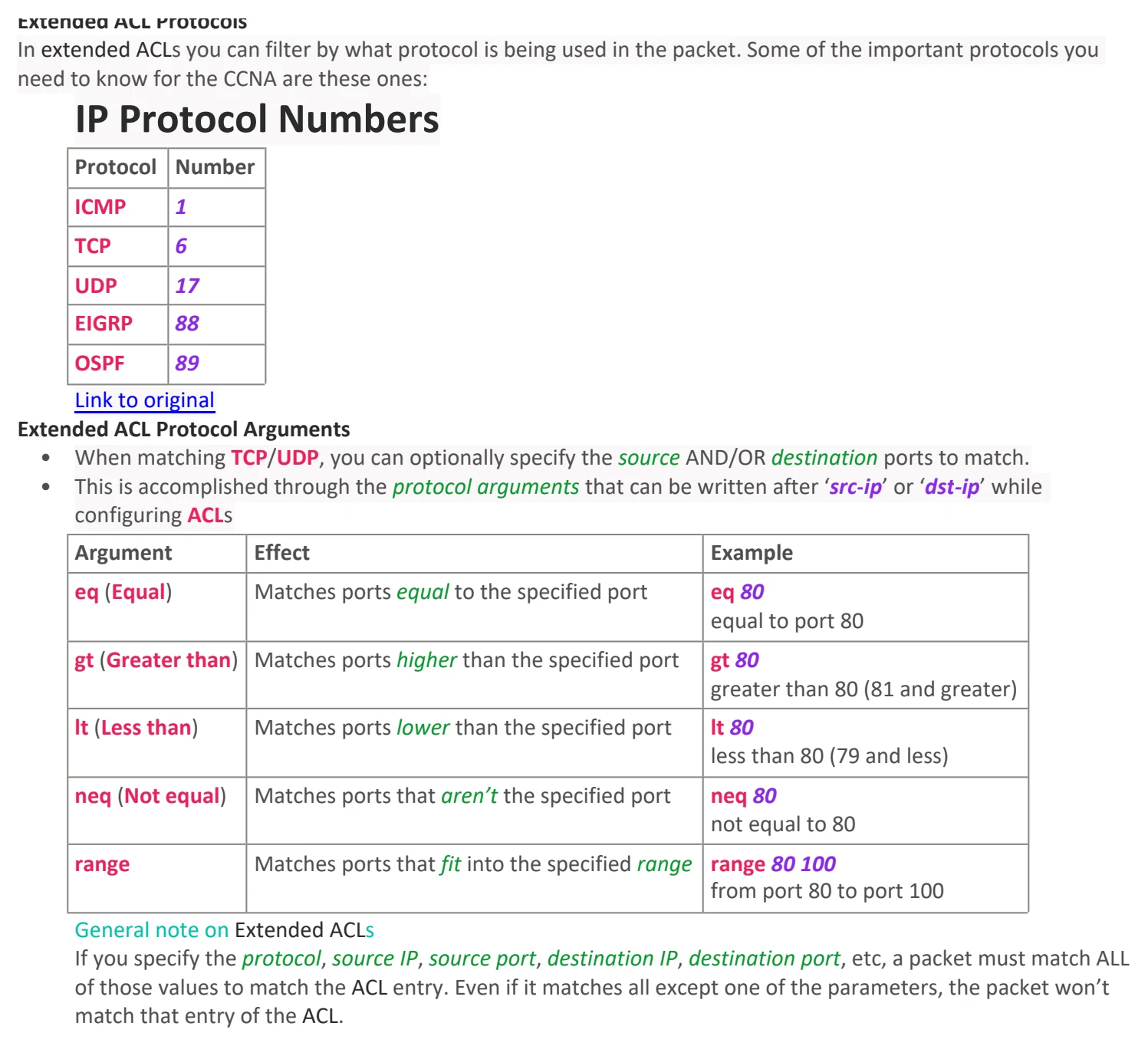
Extended ACL Protocols
In extended ACLs you can filter by what protocol is being used in the packet. Some of the important protocols you
need to know for the CCNA are these ones:
IP Protocol Numbers
Protocol Number
ICMP 1
TCP 6
UDP 17
EIGRP 88
OSPF 89
Link to original
Extended ACL Protocol Arguments
• When matching TCP/UDP, you can optionally specify the source AND/OR destination ports to match.
• This is accomplished through the protocol arguments that can be written after ‘src-ip’ or ‘dst-ip’ while
configuring ACLs
Argument Effect Example
eq (Equal) Matches ports equal to the specified port eq 80
equal to port 80
gt (Greater than) Matches ports higher than the specified port gt 80
greater than 80 (81 and greater)
lt (Less than) Matches ports lower than the specified port lt 80
less than 80 (79 and less)
neq (Not equal) Matches ports that aren’t the specified port neq 80
not equal to 80
range Matches ports that fit into the specified range range 80 100
from port 80 to port 100
General note on Extended ACLs
If you specify the protocol, source IP, source port, destination IP, destination port, etc, a packet must match ALL
of those values to match the ACL entry. Even if it matches all except one of the parameters, the packet won’t
match that entry of the ACL.

Day 35 - Extended ACLs
Sunday, September 6, 2026 10:46 AM
ACL Info
ACL Configuration Methods
There are two ways of configuring ACLs. One is done through the ‘global configuration’ mode and the other is
through the ‘ACL configuration’ mode where you write the configuration in sub-commands.
• Global configuration is done through the command:
○ access-list NUMBER { permit | deny } IP WILDCARD-MASK
• ACL configuration is done through the command:
○ ip access-list standard NAME/NUMBER
Advantages of Named ACL Config Mode
• Going into the ACL configuration mode allows you to delete individual entries in the ACL with no ENTRY-
NUMBER. (Deleting individual entries in global configuration will lead to the deletion of the whole ACL, even if
one entry was specified)
• You can insert new entries in between other entries by specifying the sequence number.
Resequencing ACLs
ACL has a resequencing function that allows you to edit ACL entries.
• It is done through the command:
○ ip access-list resequence ACL-ID STARTING-SEQ-NUM INCREMENT
Extended ACLs
Extended ACLs are very similar to Standard ACLs
• Extended ACLs match based on source/destination IP address, source/destination port address, etc.
• Extended ACLs can use the number range (100 - 199) and (2000 - 2699)
• They should be applied as close to the source as possible.
• They include two subtypes:
1. Extended numbered ACLs
2. Extended named ACLs
Extended ACL Configuration
There are two ways to create a extended ACL:
1. Global configuration / directly
○ This method only allows you to create numbered ACLs
○ Done through the command:
§ access-list EXTENDED-ACL-NUMBER { permit | deny } PROTOCOL SRC-IP DST-IP
2. ACL configuration mode
○ Done through the command:
§ ip access-list extended NUMBER/NAME
○ Which puts you in Extended ACL configuration mode. ACEs can be set through the following command
format:
§ [entry-number] { deny | permit } protocol src-ip dst-ip
§ [entry-number] { deny | permit } protocol src-ip argument source-port-num dst-ip argument dst-
port-num
Standard and Extended ACL - Host addresses
In standard ACLs, you could specify the source IP address, insert the command, and the router would
automatically assume that it’s a host route.
However, in extended ACLs, to specify a /32 source or destination you have to use either the host option or
specify the wildcard mask. You can’t just write the address without either of those.
Extended ACL Protocols
In extended ACLs you can filter by what protocol is being used in the packet. Some of the important protocols you
need to know for the CCNA are these ones:
IP Protocol Numbers
Protocol Number
ICMP 1
TCP 6
UDP 17
EIGRP 88
OSPF 89
Link to original
Extended ACL Protocol Arguments
• When matching TCP/UDP, you can optionally specify the source AND/OR destination ports to match.
• This is accomplished through the protocol arguments that can be written after ‘src-ip’ or ‘dst-ip’ while
configuring ACLs
Argument Effect Example
eq (Equal) Matches ports equal to the specified port eq 80
equal to port 80
gt (Greater than) Matches ports higher than the specified port gt 80
greater than 80 (81 and greater)
lt (Less than) Matches ports lower than the specified port lt 80
less than 80 (79 and less)
neq (Not equal) Matches ports that aren’t the specified port neq 80
not equal to 80
range Matches ports that fit into the specified range range 80 100
from port 80 to port 100
General note on Extended ACLs
If you specify the protocol, source IP, source port, destination IP, destination port, etc, a packet must match ALL
of those values to match the ACL entry. Even if it matches all except one of the parameters, the packet won’t
match that entry of the ACL.