
Day 36 / 63 · Network services
CDP & LLDP
Study notes based primarily on Jeremy’s IT Lab CCNA learning videos. Credit to Jeremy’s IT Lab for the source lessons and diagrams.
CDP & LLDP
Download original PDF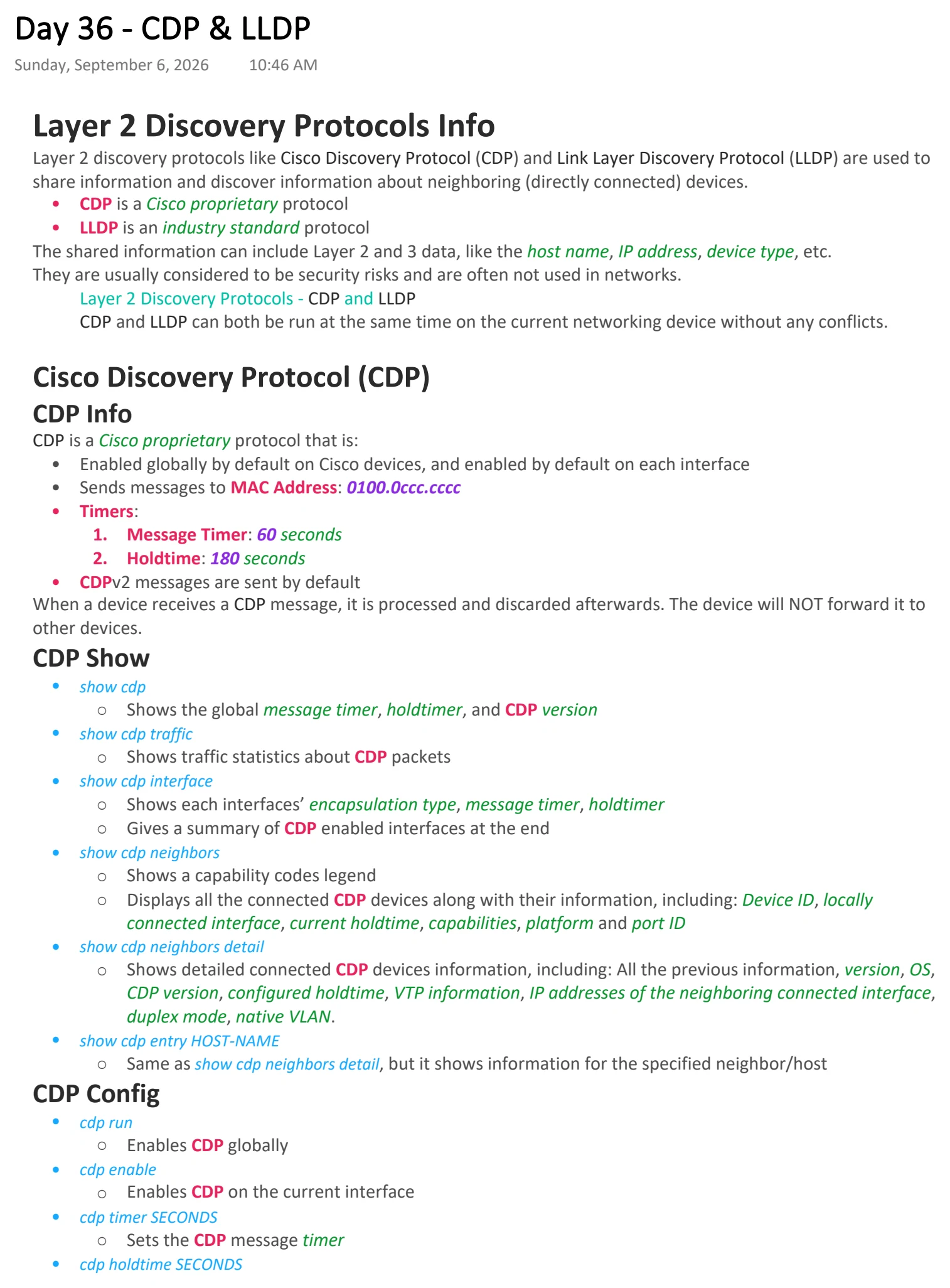
Text view — CDP & LLDP
Extracted from the original export. Diagrams and some formatting appear in the notes above.
Day 36 - CDP & LLDP
Sunday, September 6, 2026 10:46 AM
Layer 2 Discovery Protocols Info
Layer 2 discovery protocols like Cisco Discovery Protocol (CDP) and Link Layer Discovery Protocol (LLDP) are used to
share information and discover information about neighboring (directly connected) devices.
• CDP is a Cisco proprietary protocol
• LLDP is an industry standard protocol
The shared information can include Layer 2 and 3 data, like the host name, IP address, device type, etc.
They are usually considered to be security risks and are often not used in networks.
Layer 2 Discovery Protocols - CDP and LLDP
CDP and LLDP can both be run at the same time on the current networking device without any conflicts.
Cisco Discovery Protocol (CDP)
CDP Info
CDP is a Cisco proprietary protocol that is:
• Enabled globally by default on Cisco devices, and enabled by default on each interface
• Sends messages to MAC Address: 0100.0ccc.cccc
• Timers:
1. Message Timer: 60 seconds
2. Holdtime: 180 seconds
• CDPv2 messages are sent by default
When a device receives a CDP message, it is processed and discarded afterwards. The device will NOT forward it to
other devices.
CDP Show
• show cdp
○ Shows the global message timer, holdtimer, and CDP version
• show cdp traffic
○ Shows traffic statistics about CDP packets
• show cdp interface
○ Shows each interfaces’ encapsulation type, message timer, holdtimer
○ Gives a summary of CDP enabled interfaces at the end
• show cdp neighbors
○ Shows a capability codes legend
○ Displays all the connected CDP devices along with their information, including: Device ID, locally
connected interface, current holdtime, capabilities, platform and port ID
• show cdp neighbors detail
○ Shows detailed connected CDP devices information, including: All the previous information, version, OS,
CDP version, configured holdtime, VTP information, IP addresses of the neighboring connected interface,
duplex mode, native VLAN.
• show cdp entry HOST-NAME
○ Same as show cdp neighbors detail, but it shows information for the specified neighbor/host
CDP Config
• cdp run
○ Enables CDP globally
• cdp enable
○ Enables CDP on the current interface
• cdp timer SECONDS
○ Sets the CDP message timer
• cdp holdtime SECONDS
○ Sets the CDP message holdtime
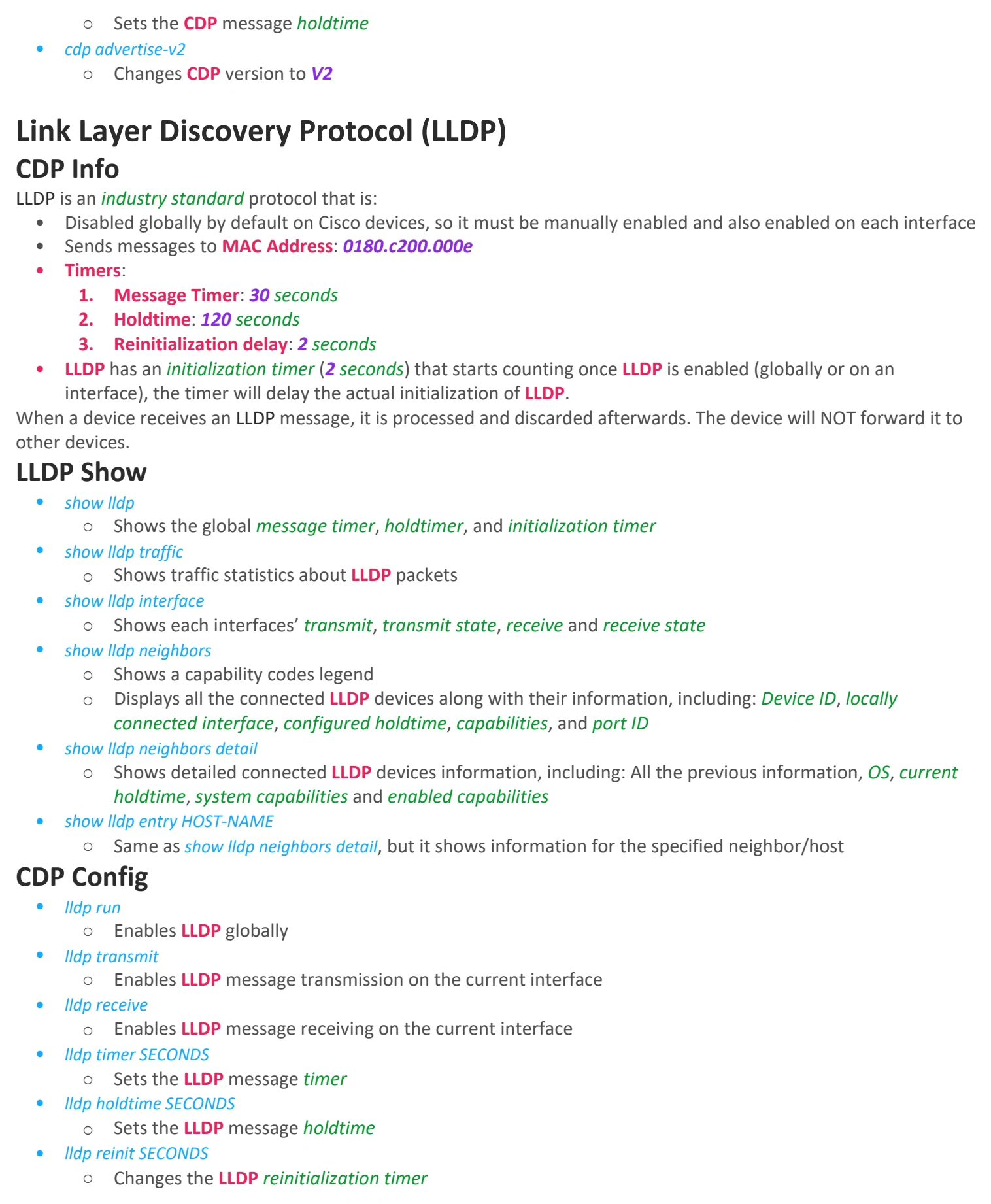
• cdp advertise-v2
○ Changes CDP version to V2
Link Layer Discovery Protocol (LLDP)
CDP Info
LLDP is an industry standard protocol that is:
• Disabled globally by default on Cisco devices, so it must be manually enabled and also enabled on each interface
• Sends messages to MAC Address: 0180.c200.000e
• Timers:
1. Message Timer: 30 seconds
2. Holdtime: 120 seconds
3. Reinitialization delay: 2 seconds
• LLDP has an initialization timer (2 seconds) that starts counting once LLDP is enabled (globally or on an
interface), the timer will delay the actual initialization of LLDP.
When a device receives an LLDP message, it is processed and discarded afterwards. The device will NOT forward it to
other devices.
LLDP Show
• show lldp
○ Shows the global message timer, holdtimer, and initialization timer
• show lldp traffic
○ Shows traffic statistics about LLDP packets
• show lldp interface
○ Shows each interfaces’ transmit, transmit state, receive and receive state
• show lldp neighbors
○ Shows a capability codes legend
○ Displays all the connected LLDP devices along with their information, including: Device ID, locally
connected interface, configured holdtime, capabilities, and port ID
• show lldp neighbors detail
○ Shows detailed connected LLDP devices information, including: All the previous information, OS, current
holdtime, system capabilities and enabled capabilities
• show lldp entry HOST-NAME
○ Same as show lldp neighbors detail, but it shows information for the specified neighbor/host
CDP Config
• lldp run
○ Enables LLDP globally
• lldp transmit
○ Enables LLDP message transmission on the current interface
• lldp receive
○ Enables LLDP message receiving on the current interface
• lldp timer SECONDS
○ Sets the LLDP message timer
• lldp holdtime SECONDS
○ Sets the LLDP message holdtime
• lldp reinit SECONDS
○ Changes the LLDP reinitialization timer

Day 36 - CDP & LLDP
Sunday, September 6, 2026 10:46 AM
Layer 2 Discovery Protocols Info
Layer 2 discovery protocols like Cisco Discovery Protocol (CDP) and Link Layer Discovery Protocol (LLDP) are used to
share information and discover information about neighboring (directly connected) devices.
• CDP is a Cisco proprietary protocol
• LLDP is an industry standard protocol
The shared information can include Layer 2 and 3 data, like the host name, IP address, device type, etc.
They are usually considered to be security risks and are often not used in networks.
Layer 2 Discovery Protocols - CDP and LLDP
CDP and LLDP can both be run at the same time on the current networking device without any conflicts.
Cisco Discovery Protocol (CDP)
CDP Info
CDP is a Cisco proprietary protocol that is:
• Enabled globally by default on Cisco devices, and enabled by default on each interface
• Sends messages to MAC Address: 0100.0ccc.cccc
• Timers:
1. Message Timer: 60 seconds
2. Holdtime: 180 seconds
• CDPv2 messages are sent by default
When a device receives a CDP message, it is processed and discarded afterwards. The device will NOT forward it to
other devices.
CDP Show
• show cdp
○ Shows the global message timer, holdtimer, and CDP version
• show cdp traffic
○ Shows traffic statistics about CDP packets
• show cdp interface
○ Shows each interfaces’ encapsulation type, message timer, holdtimer
○ Gives a summary of CDP enabled interfaces at the end
• show cdp neighbors
○ Shows a capability codes legend
○ Displays all the connected CDP devices along with their information, including: Device ID, locally
connected interface, current holdtime, capabilities, platform and port ID
• show cdp neighbors detail
○ Shows detailed connected CDP devices information, including: All the previous information, version, OS,
CDP version, configured holdtime, VTP information, IP addresses of the neighboring connected interface,
duplex mode, native VLAN.
• show cdp entry HOST-NAME
○ Same as show cdp neighbors detail, but it shows information for the specified neighbor/host
CDP Config
• cdp run
○ Enables CDP globally
• cdp enable
○ Enables CDP on the current interface
• cdp timer SECONDS
○ Sets the CDP message timer
• cdp holdtime SECONDS
○ Sets the CDP message holdtime
• cdp advertise-v2
○ Changes CDP version to V2
Link Layer Discovery Protocol (LLDP)
CDP Info
LLDP is an industry standard protocol that is:
• Disabled globally by default on Cisco devices, so it must be manually enabled and also enabled on each interface
• Sends messages to MAC Address: 0180.c200.000e
• Timers:
1. Message Timer: 30 seconds
2. Holdtime: 120 seconds
3. Reinitialization delay: 2 seconds
• LLDP has an initialization timer (2 seconds) that starts counting once LLDP is enabled (globally or on an
interface), the timer will delay the actual initialization of LLDP.
When a device receives an LLDP message, it is processed and discarded afterwards. The device will NOT forward it to
other devices.
LLDP Show
• show lldp
○ Shows the global message timer, holdtimer, and initialization timer
• show lldp traffic
○ Shows traffic statistics about LLDP packets
• show lldp interface
○ Shows each interfaces’ transmit, transmit state, receive and receive state
• show lldp neighbors
○ Shows a capability codes legend
○ Displays all the connected LLDP devices along with their information, including: Device ID, locally
connected interface, configured holdtime, capabilities, and port ID
• show lldp neighbors detail
○ Shows detailed connected LLDP devices information, including: All the previous information, OS, current
holdtime, system capabilities and enabled capabilities
• show lldp entry HOST-NAME
○ Same as show lldp neighbors detail, but it shows information for the specified neighbor/host
CDP Config
• lldp run
○ Enables LLDP globally
• lldp transmit
○ Enables LLDP message transmission on the current interface
• lldp receive
○ Enables LLDP message receiving on the current interface
• lldp timer SECONDS
○ Sets the LLDP message timer
• lldp holdtime SECONDS
○ Sets the LLDP message holdtime
• lldp reinit SECONDS
○ Changes the LLDP reinitialization timer